Style transforms
3D Figurine Generator: you as a collectible figure on a desk
The viral figurine trend in one click: your photo as a boxed collectible standing on a desk, with its 3D model on the screen behind it.
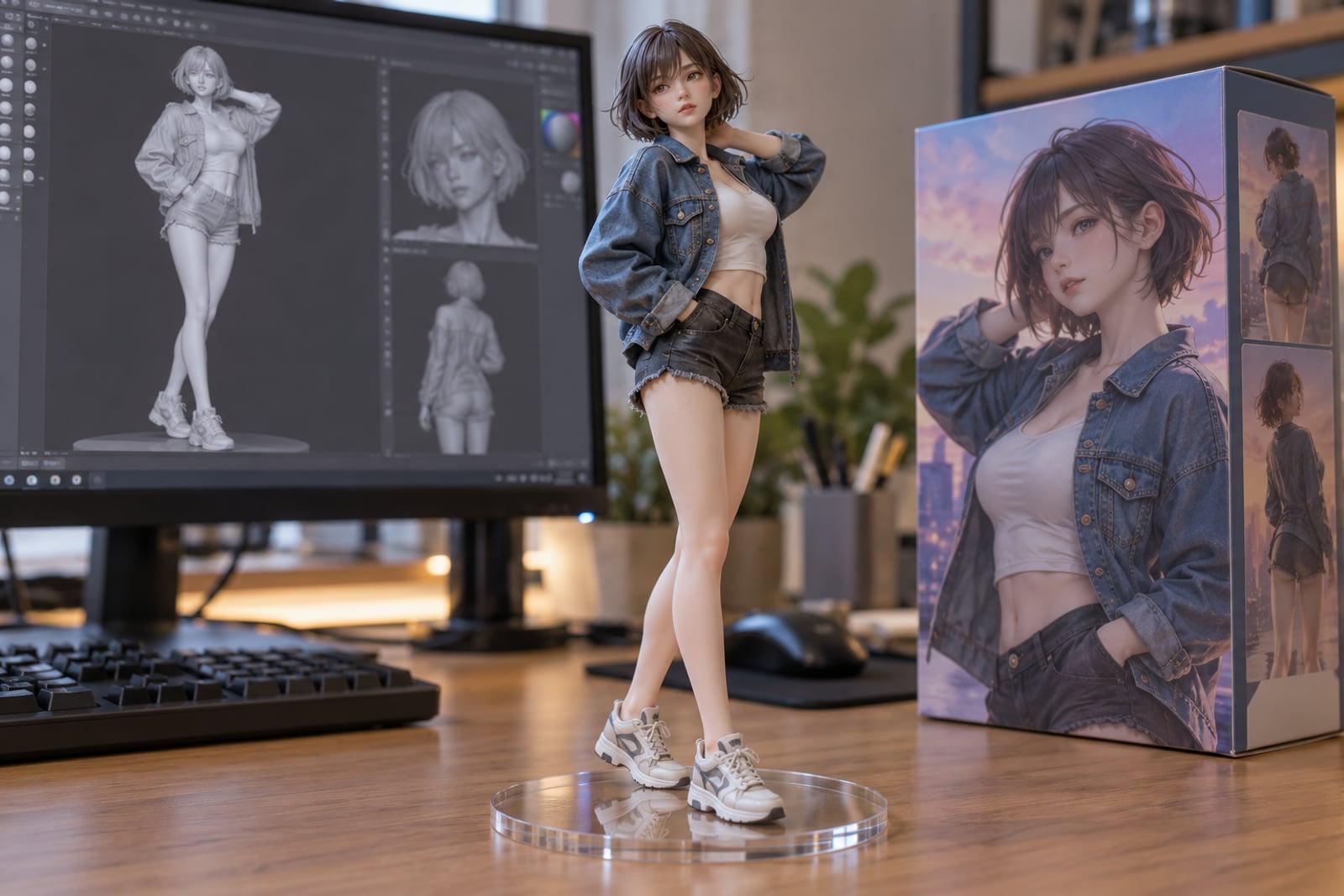
3D Figurine Generator turns a photo of you into the collectible figure that took over social feeds: a detailed figure on a clear base, standing on a desk next to its printed box, with the 3D modeling software on the monitor behind it. Upload one photo, pick the figure style and the scene, and generate.
What is the 3D Figurine Generator?
The tool builds the whole product scene from one photo: the figure itself with your face, hair and outfit translated into painted plastic or resin, the base it stands on, the collector box with its artwork, and the setting around it. You can choose a realistic 1/7 scale figure, an anime figure, a chibi figure with a big head, or a painted resin statue.
Like the original trend, the result is an image, not a 3D file. It looks like a photo of a real figure, which is what makes it fun to share. Full-body photos with clear clothing give the best figures; close-up selfies work too, but the tool has to invent more of the body.
3D Figurine Generator features
Four figure styles
Realistic 1/7 scale, anime, chibi or a painted resin statue. Each keeps your face and outfit recognizable in its own material and proportions.
The full trend scene
The desk version recreates the viral setup: the figure, its printed collector box and the 3D modeling screen behind it.
Shelf and studio options
Prefer a collector shelf with LED lighting or a clean product studio shot? Switch the scene without changing the figure.
Extra instructions
Add details such as a pet beside the figure, a different outfit or a favorite prop, and the tool includes them.
How to use the 3D Figurine Generator
- 1
Upload a photo
A full-body or half-body photo with clear clothing and an unobstructed face works best.
- 2
Pick the figure style
Choose realistic, anime, chibi or resin statue.
- 3
Pick the scene
Desk with the 3D modeling screen for the classic trend look, a collector shelf, or a studio shot.
- 4
Generate and share
Download the image, or rerun with a different style for a whole set.
3D Figurine Generator details
| Best for | Anyone who wants the figurine trend without the prompt work |
|---|---|
| Category | Style transforms |
| Powered by | Nano Banana 2 (Google) |
| Credits per image | 40 credits at 1K |
| Photos you upload | Your photo |
| Aspect ratios | 1:1, 3:4, 4:3 |
| Adjustable options | Figure style, Display scene, extra instructions |
| Included in plans | Premium, Pro |
What people make with the 3D Figurine Generator
Join the trend
Post your own version of the figurine trend without writing a long prompt or fixing the scene by hand.
Gifts and cards
A figure of a friend on a collector’s desk makes a memorable birthday card or leaving present, with their consent.
Brand mascots and creators
Show a mascot or a creator as a collectible to tease merch ideas before anyone pays for real tooling.
A starting point for 3D printing
Use a studio shot as the reference image for an image-to-3D tool when you want a real printed figure.
3D Figurine Generator FAQ
What is the 3D figurine trend?
A viral edit that shows a person as a collectible figure on a desk, with its printed box and the 3D model on a computer screen behind it. This tool recreates it from one photo.
Does the tool make a real 3D model?
No. It makes an image that looks like a photo of a real figure. To get a 3D file, use the studio version as input for an image-to-3D tool.
What photo works best?
A full-body or half-body photo with good light, a clear face and visible clothing. Group photos and heavy filters make the figure less accurate.
Can I make a figurine of my pet?
Yes. Upload a clear photo of your pet and use the extra instructions to say it is an animal figure.
Can I add my name to the box?
Yes. Use the extra instructions, for example “print the name MAYA on the box”, and keep the text short so it renders cleanly.
Related tools
Pricing
Choose the perfect plan to unlock more creativity with premium AI-powered image generation.
Standard
Perfect for creators and content makers
- 1,500 Credits per month
- High-quality AI image generation
- Text-to-image & image-to-image
- Premium templates library
- Priority support
Premium
For professionals and power creators
- 4,000 Credits per month
- Ultra high-quality generations
- Advanced AI models & styles
- Priority processing & support
- Commercial usage rights
Pro
Most advanced models for premium visuals
- 10,000 Credits per month
- All models incl. Nano Banana PRO
- All resolutions (1K, 2K & 4K)
- Premium-quality generation & smart edits
- Priority processing & support
Need more credits?
All plans include the option to purchase additional credit packs when you need extra generating power. Scale your creativity without limits.
Payments are securely processed by Stripe, our merchant of record. Subscriptions renew automatically at the listed price until you cancel; cancel anytime in your account settings. By continuing you agree to our Terms, Privacy Policy and Refund & Cancellation Policy. Need help? Contact support@nanobananai.ai.