Style transforms
Pixel Art Converter: your photo as retro 16-bit art
Converts photos into 16-bit style pixel art for avatars, game projects, and retro gifts.
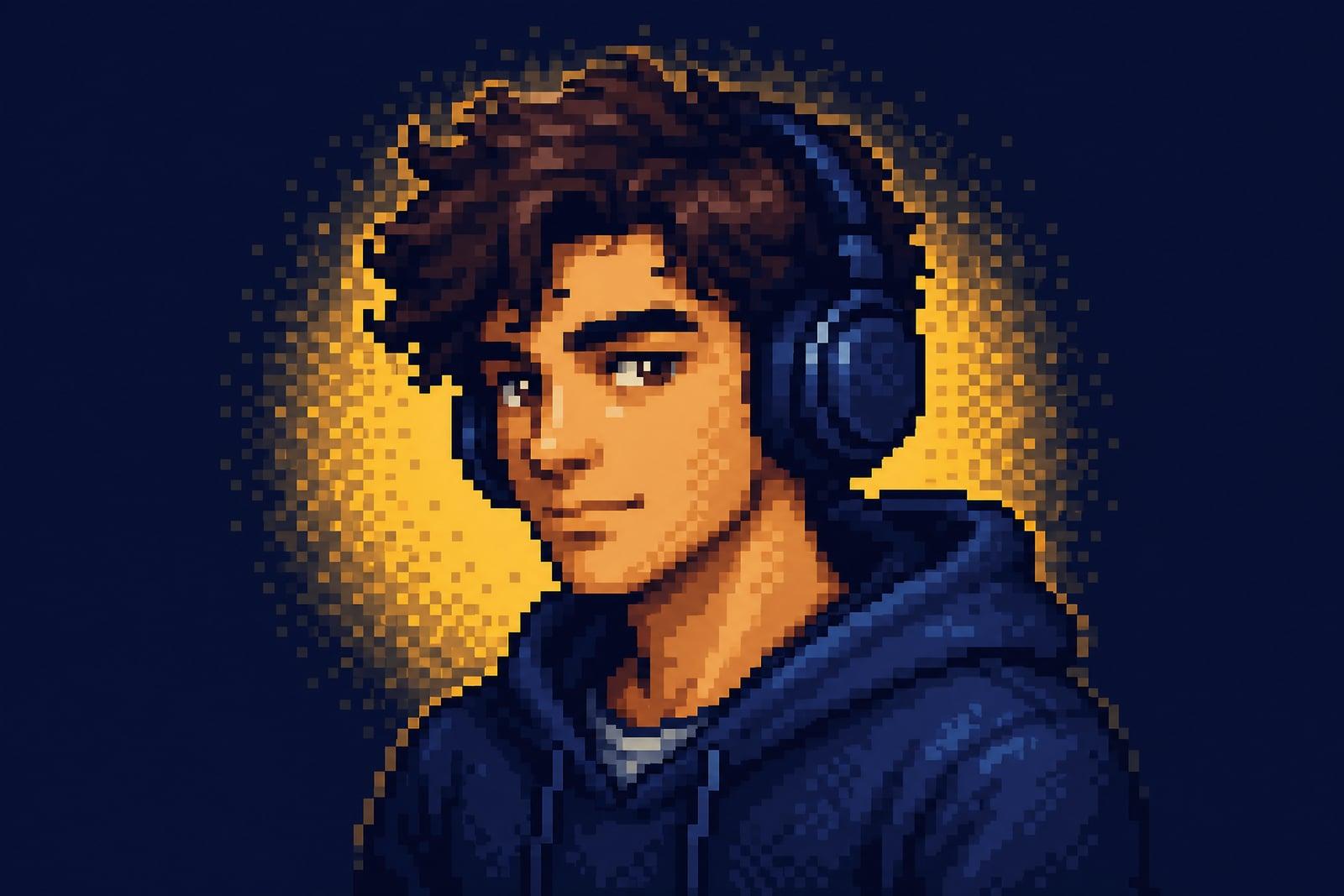
Pixel Art Converter turns a photo you upload into retro 16-bit style pixel art. One picture in, and out comes a chunky-pixel version with a limited palette and clean sprite edges, the look of a character select screen from the early nineties. It handles portraits, pets, and scenes. Results save to your library, and rerunning with a tighter crop is quick.
What is the Pixel Art Converter?
Upload a photo and generate; the converter rebuilds it pixel by pixel at sprite-like scale. Rather than shrinking your image until it looks broken, it makes deliberate choices: which colors to keep, where a single pixel should stand in for an eye, how to keep silhouettes readable. Good pixel art is about restraint, and restraint is what it applies.
Doing this by hand in an editor takes hours of nudging individual pixels, and naive downscaling produces mud. The hard problems are palette reduction (hundreds of skin tones down to five or six) and edge decisions, where one misplaced pixel of outline ruins a face. The tool makes those calls for you while keeping the subject recognizable at a glance.
Pixel Art Converter features
Authentic 16-bit look
Limited palettes, hard pixel edges, and careful dithering give results that pass as period game art rather than a mosaic filter laid over a photograph. The pixel grid stays consistent across the whole image, which is what sells the effect.
Readable at small sizes
Sprites are judged at a glance, so the converter protects silhouettes and facial landmarks. Your avatar stays recognizable even scaled down to forum-icon size. Faces hold up where photographic detail would turn to noise.
Any subject works
Selfies become player characters and pets become companions. Even a street or desk photo converts into something like a pixel RPG background. Nostalgia does a lot of work once the palette locks in.
Cheap to iterate
Runs are fast, so you can test different crops and palettes. Tight head-and-shoulders crops usually make the strongest sprites. A five-minute session usually produces one keeper and a few near misses worth saving anyway.
How to use the Pixel Art Converter
- 1
Upload and crop tight
Close crops convert best because every pixel has to earn its place. A head-and-shoulders shot beats a full-body photo across a parking lot.
- 2
Generate the sprite
Run it and inspect the face at full size and at thumbnail size. Strong pixel art reads at both. If the eyes read clearly, the sprite works.
- 3
Rerun for palette moods
Each pass can shift the palette, cooler dusk tones or warm sunset tones, so regenerate until the color story fits where the art will live.
- 4
Download and deploy
Save from your library and drop it into your profile, stream overlay, or mockup. It scales up crisply if you keep the hard edges.
Pixel Art Converter details
| Best for | Gamers and indie devs who want sprites of real photos |
|---|---|
| Category | Style transforms |
| Powered by | Nano Banana (Google) |
| Credits per image | 20 credits at 1K |
| Photos you upload | Your photo |
| Aspect ratios | 1:1, 4:3, 16:9 |
| Adjustable options | None, one-click result |
| Included in plans | Standard, Premium, Pro |
What people make with the Pixel Art Converter
Retro gaming avatars
A pixel version of your actual face fits gaming forums, speedrun communities, and retro Discord servers better than a photo ever will. It also signals your taste in games before you say a word.
Indie game mockups
Developers convert reference photos into sprite-style art to pitch a vibe or fill placeholder slots before a pixel artist joins the project. It answers the art-direction question early, before any budget gets spent.
Gifts for gamer partners
A framed pixel portrait of a couple, styled like a two-player select screen, is a nerdy anniversary gift with a very high hit rate. Add matching frames and it becomes a set.
Stream and channel graphics
Pixel art of the streamer makes cohesive emotes, starting-soon screens, and channel badges with a retro identity viewers remember. One conversion can seed a whole set of matching channel assets.
Pixel Art Converter FAQ
How does the Pixel Art Converter handle faces?
It prioritizes the handful of pixels that carry identity: hairline, eye placement, mouth. That is why converted selfies stay recognizable when a simple downscale would smear them. Tight crops with clear light give it the most to work with.
What resolution does the pixel art feel like?
The style targets a 16-bit era look with chunky, deliberate pixels and a reduced palette. The file you download is sharp and detailed, so it prints and scales cleanly while keeping the low-res aesthetic. Zoomed in, the pixel edges stay crisp instead of blurring.
Can I use pixel art from my photos in a game I sell?
Yes. Images you generate are yours to use commercially, including inside games, on merch, and in marketing. Many developers use it for prototypes and jam entries, then decide later whether to redraw assets by hand.
Why does my pixel art look cluttered?
Usually the source photo is too wide or too busy. Pixel art thrives on simple silhouettes, so crop to the subject and rerun. A plain wall behind you will noticeably clean up the sprite. Faces benefit the most from this cleanup.
Can it do pets and objects, or only people?
It converts pets, plants, cars, food, and whole scenes. Cats and dogs make especially good sprites since their silhouettes are already iconic. Scene photos come back looking like backgrounds from a pixel adventure game. Try your breakfast; the results are oddly charming.
Related tools
Pricing
Choose the perfect plan to unlock more creativity with premium AI-powered image generation.
Standard
Perfect for creators and content makers
- 1,500 Credits per month
- High-quality AI image generation
- Text-to-image & image-to-image
- Premium templates library
- Priority support
Premium
For professionals and power creators
- 4,000 Credits per month
- Ultra high-quality generations
- Advanced AI models & styles
- Priority processing & support
- Commercial usage rights
Pro
Most advanced models for premium visuals
- 10,000 Credits per month
- All models incl. Nano Banana PRO
- All resolutions (1K, 2K & 4K)
- Premium-quality generation & smart edits
- Priority processing & support
Need more credits?
All plans include the option to purchase additional credit packs when you need extra generating power. Scale your creativity without limits.
Payments are securely processed by Stripe, our merchant of record. Subscriptions renew automatically at the listed price until you cancel; cancel anytime in your account settings. By continuing you agree to our Terms, Privacy Policy and Refund & Cancellation Policy. Need help? Contact support@nanobananai.ai.