Fun & creative
AI Tattoo Generator for custom designs you can preview first
Preview custom tattoo designs from a written idea before anything is permanent.
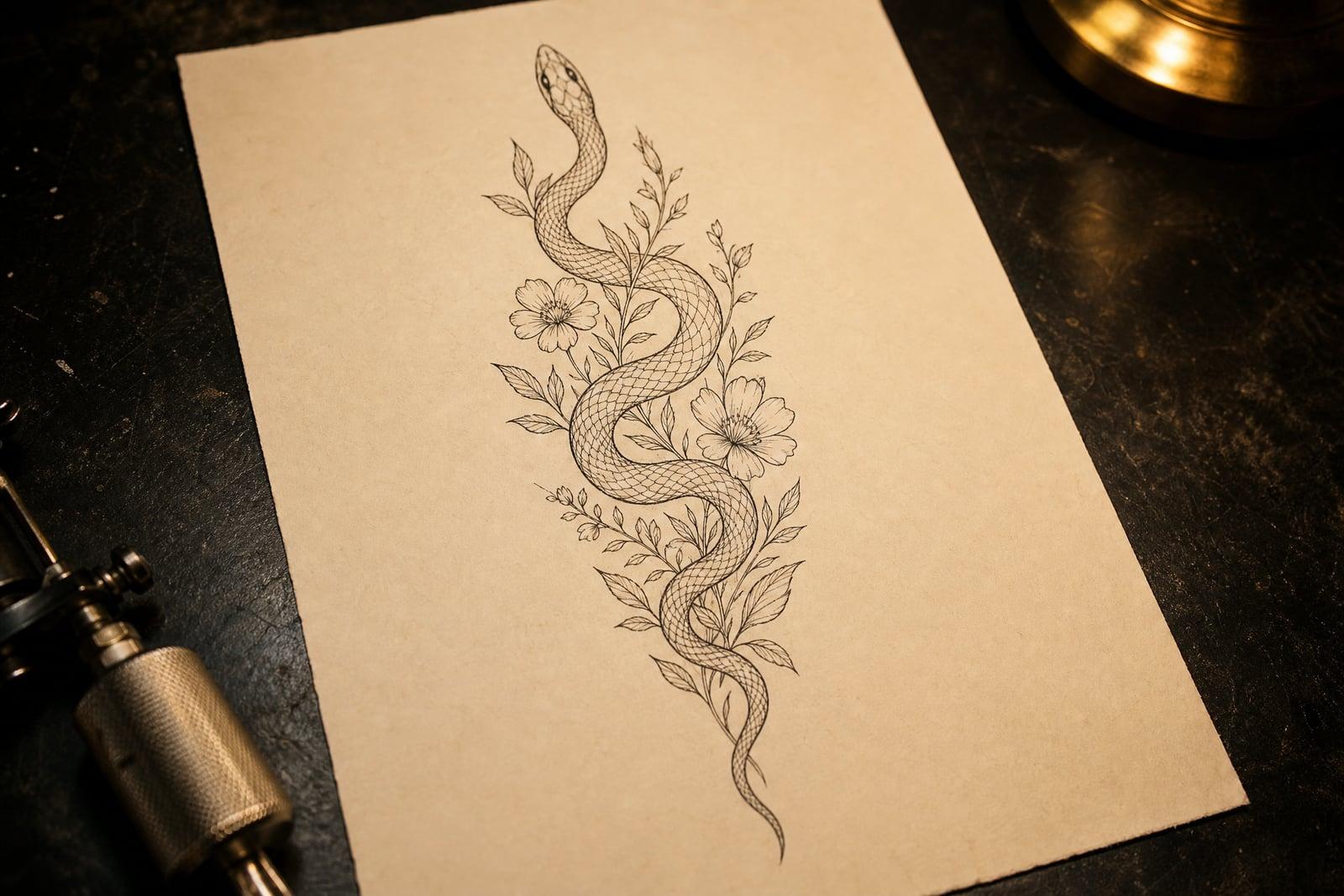
The AI Tattoo Generator designs custom tattoo concepts from a written description. No photo is needed: type the subject, placement, and style you have in mind, like a fine line fox on a forearm, and generate. You get back clean tattoo artwork you can save, compare, and bring to your artist as a reference. It is a cheap way to look at an idea before it becomes permanent.
What is the AI Tattoo Generator?
The AI Tattoo Generator is a text-to-image tool built for tattoo design. You describe the concept, pick a style such as fine line, American traditional, blackwork, or watercolor, and generate. Each result is a clean design on a neutral background, drawn the way a flash sheet would present it, so an artist can actually read the linework and quote the piece accurately.
Tattoo ideas are hard to communicate in words alone. Artists get briefs like "a snake but elegant" and have to guess. The generator turns that vague sentence into concrete linework you can react to: thicker shading here, smaller stars there. Iterating on a reference image before your consultation saves studio time, and it helps you find out early when an idea simply does not work.
AI Tattoo Generator features
Real tattoo styles
Fine line, traditional, neo-traditional, blackwork, dotwork, and watercolor each render with the conventions artists expect: bold outlines where the style calls for them, stippled shading where it does not, and sensible negative space.
Flash-sheet clarity
Designs come out on clean, neutral backgrounds with readable linework rather than muddy photo renders. That matters because your artist needs to see exactly which lines are intentional before adapting the piece to your body.
Fast idea iteration
Ten variations of the same concept cost you a few minutes. Rotate the composition, swap a rose for a peony, or thin the lines, then compare every version side by side in your library.
Placement-aware concepts
Mention the forearm, shoulder blade, spine, or ankle in your prompt and the composition adapts to that shape: long vertical pieces for forearms, compact circular designs for smaller placements like wrists.
How to use the AI Tattoo Generator
- 1
Describe your tattoo idea
Write the subject, the style, and where it will go. Specific beats vague: "fine line hummingbird with lavender sprigs, inner forearm" gives better results than "bird tattoo".
- 2
Pick a style direction
Choose fine line for delicate pieces, traditional for bold color, blackwork for high contrast. If you are undecided, generate the same idea in two styles and compare.
- 3
Generate and compare
Create a few variations of your favorite direction. Small prompt changes, like adding shading or simplifying background elements, often fix a design that feels almost right.
- 4
Save it for your artist
Download the concepts you like and bring them to your consultation. A good artist will adapt the reference to your body and their technique rather than copy it line for line.
AI Tattoo Generator details
| Best for | People planning a tattoo who want to see it before committing |
|---|---|
| Category | Fun & creative |
| Powered by | FLUX.2 (Black Forest Labs) |
| Credits per image | 25 credits at 1K |
| Photos you upload | None, this tool works from your text idea |
| Aspect ratios | 1:1, 3:4 |
| Adjustable options | Tattoo subject, Tattoo style |
| Included in plans | Standard, Premium, Pro |
What people make with the AI Tattoo Generator
First tattoo planning
Seeing a concept rendered often changes your mind, and that is the point. Test the moth, the snake, and the quote arrangement before anything touches skin, then walk into the studio with real confidence.
Consultation references
Walking into a studio with three concrete concepts beats describing an idea from memory. Artists quote faster and more accurately when the reference shows style, density, and size expectations up front.
Matching and memorial pieces
Couples and friends can iterate on matching designs together, then tweak until both people like the result. Memorial tattoos benefit too, since dates, flowers, and portraits need careful arrangement before inking.
Sleeve concept sketching
A sleeve is a sequence of connected pieces, and planning it is a project. Generate individual elements, see how motifs repeat, and build a reference board your artist can actually work from.
AI Tattoo Generator FAQ
How does the AI Tattoo Generator work?
You type a description of the tattoo you want, choose options, and generate. The tool draws a clean concept in your chosen style in moments. There is no photo upload; everything starts from your written idea, and you can regenerate variations until the design feels right.
Can I get the design tattooed for real?
Yes. The concepts you generate are yours, and many people bring them to studios as references. Expect your artist to adapt the design: good tattooers adjust linework and sizing for your skin, your placement, and how the piece will age over decades.
Which tattoo styles can it draw?
Fine line, American traditional, neo-traditional, blackwork, dotwork, geometric, watercolor, and ornamental lettering-adjacent work all render well. Photorealism concepts are possible, but treat them as mood references, since realism depends heavily on the individual artist's skill.
Do I need to upload a photo?
No. The AI Tattoo Generator works from text alone. Describe the subject, style, and placement, and it draws the concept from scratch. If you want to picture the design on your own arm, save it and hold your phone screen against the spot.
Can I use my designs commercially?
Yes. Anything you generate belongs to you, commercial work included. Some flash artists use the tool to rough out sheet ideas before redrawing them by hand. Selling designs, printing them, or publishing them online is all allowed with no attribution required.
Related tools
Pricing
Choose the perfect plan to unlock more creativity with premium AI-powered image generation.
Standard
Perfect for creators and content makers
- 1,500 Credits per month
- High-quality AI image generation
- Text-to-image & image-to-image
- Premium templates library
- Priority support
Premium
For professionals and power creators
- 4,000 Credits per month
- Ultra high-quality generations
- Advanced AI models & styles
- Priority processing & support
- Commercial usage rights
Pro
Most advanced models for premium visuals
- 10,000 Credits per month
- All models incl. Nano Banana PRO
- All resolutions (1K, 2K & 4K)
- Premium-quality generation & smart edits
- Priority processing & support
Need more credits?
All plans include the option to purchase additional credit packs when you need extra generating power. Scale your creativity without limits.
Payments are securely processed by Stripe, our merchant of record. Subscriptions renew automatically at the listed price until you cancel; cancel anytime in your account settings. By continuing you agree to our Terms, Privacy Policy and Refund & Cancellation Policy. Need help? Contact support@nanobananai.ai.