Fun & creative
Sneaker Designer: custom sneaker concepts and colorways
Turn a colorway idea or a base shoe photo into a product-quality sneaker render you can iterate on.
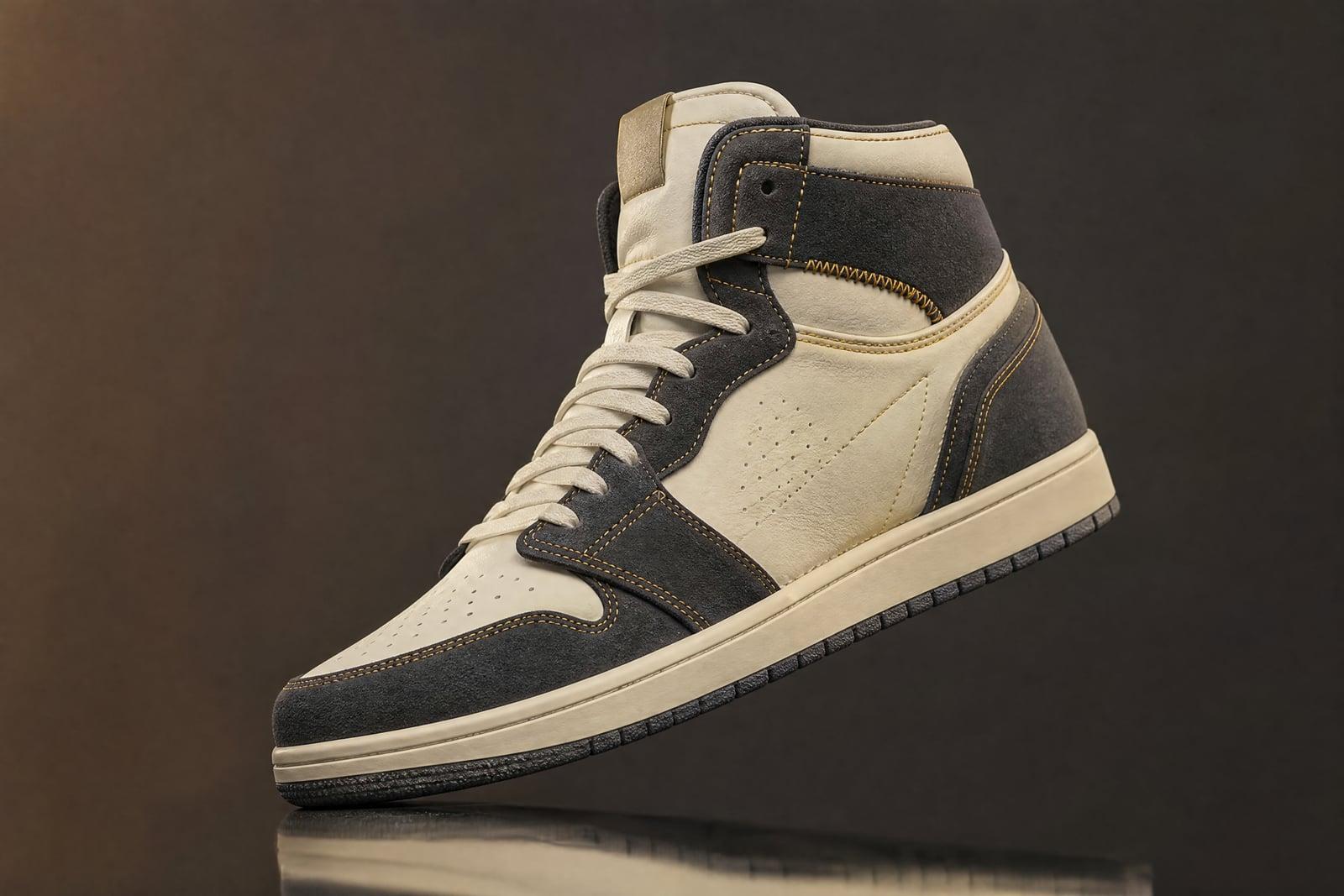
The Sneaker Designer renders custom sneaker concepts from a description, a colorway idea, or a photo of a base shoe you want to reimagine. Type the silhouette, materials, and palette, generate, and get a product-style render of the design. Uploading a shoe photo is optional. Sneakerheads use it to mock up dream pairs, and small brands use it to test concepts before paying for samples.
What is the Sneaker Designer?
The Sneaker Designer is a concept tool for footwear. Working from text alone, you describe a silhouette, high-top, chunky runner, minimal court shoe, plus materials and colors, and it renders the shoe as a clean product shot. Working from a photo, you upload a base shoe and describe the changes, and the render reimagines that pair in your new direction. Both paths finish in your library, ready to compare.
Sneaker design punishes guesswork. A colorway that sings in your head can die on an actual last, and physical samples cost hundreds of dollars and weeks of waiting. Panel breaks, material contrasts, and proportion are the things amateurs misjudge, and they are exactly what the renders make visible. You find out the tan suede fights the neon laces on screen, not on a sample invoice.
Sneaker Designer features
Text or photo starting point
Describe a shoe from nothing, or upload a beater from your closet and restyle it. The photo route is the fun one: your scuffed everyday pair reborn in cracked leather and gum soles.
Material honesty
Suede, tumbled leather, knit, mesh, and patent each render with correct texture and sheen. Material contrast is half of what makes a colorway work, and the previews let you judge it properly.
Product-shot presentation
Concepts come out lit and angled like catalog photography, on clean backgrounds. A render that already looks like a product page makes it easy to gauge whether the design holds up.
Iterate before you sample
Swap the sole color, mute the accent, try the same panel scheme on a low-top. Ten variations cost minutes, which is the whole argument against ordering a factory sample on a hunch.
How to use the Sneaker Designer
- 1
Describe the shoe
Name the silhouette first, then materials and palette: "chunky retro runner, grey suede and mesh, burnt orange accents, gum sole". Silhouette sets everything else.
- 2
Add a base photo if you have one
Optional. A clean side-profile shot of the shoe on a plain surface restyles best. Cluttered floor pics work, but the render inherits the clutter's lighting.
- 3
Generate
Render the concept and study the panel breaks and proportions. If the shape drifts from what you meant, restate the silhouette more firmly and rerun.
- 4
Refine the colorway
Change one variable per iteration, sole, laces, accent panel, so you can tell what improved. Save the contenders and line them up in your library.
Sneaker Designer details
| Best for | Sneakerheads and small brands testing colorways before sampling. |
|---|---|
| Category | Fun & creative |
| Powered by | Nano Banana (Google) |
| Credits per image | 20 credits at 1K |
| Photos you upload | Base shoe photo (optional) (optional) |
| Aspect ratios | 1:1, 4:3 |
| Adjustable options | Describe the design |
| Included in plans | Standard, Premium, Pro |
What people make with the Sneaker Designer
Dream pair mockups
Sneakerheads can finally render the colorway that no brand will ever make, the one they have described to friends for years. It is a satisfying way to settle whether the idea was actually good.
Small brand sampling
Independent footwear brands can explore ten directions on screen and send only the strongest one to the factory. At hundreds of dollars per physical sample, the render pass pays for itself immediately.
Custom painters
Artists who hand-paint shoes can render the proposed design on the client's actual pair before the first drop of paint. Approvals get faster and disputes about "that's not what I asked for" disappear.
Content and community
Concept colorways are reliable engagement for sneaker pages and Discord communities. Post two candidate renders, let followers vote on the winner, and you have a full week of comment-section debate.
Sneaker Designer FAQ
Can the Sneaker Designer restyle a photo of my own shoes?
Yes. Upload a photo of the pair, describe the new materials and colors, and the render reimagines that shoe in your direction. A sharp side-profile photo on a plain background gives the cleanest result, since the tool reads the silhouette from your image.
Do I need to know footwear terminology?
No. "The rubber part at the bottom" works, though words like sole, upper, laces, and panel get you more precise control. If you can describe the shoe to a store employee, you can describe it here. The render will teach you the vocabulary as you iterate.
Can I design a shoe that looks like a famous model?
Describe silhouettes generically, low-top court shoe, retro basketball high-top, rather than naming branded models. You get a shoe in that spirit without logos. Original designs are also safer ground if you plan to produce or sell anything based on the concept.
Are the renders good enough to send to a manufacturer?
They work well as visual direction, which is how factories and sample rooms actually start conversations. A manufacturer will still need tech packs and specs for production, but a strong render communicates the design intent faster than any written description.
Can I sell designs I create with it?
The images you generate are yours to use commercially, so posting, pitching, and selling prints or concepts is fine. Producing physical shoes brings normal design-law considerations about trademarks and existing trade dress, which is a conversation for a lawyer, not a render tool.
Related tools
Pricing
Choose the perfect plan to unlock more creativity with premium AI-powered image generation.
Standard
Perfect for creators and content makers
- 1,500 Credits per month
- High-quality AI image generation
- Text-to-image & image-to-image
- Premium templates library
- Priority support
Premium
For professionals and power creators
- 4,000 Credits per month
- Ultra high-quality generations
- Advanced AI models & styles
- Priority processing & support
- Commercial usage rights
Pro
Most advanced models for premium visuals
- 10,000 Credits per month
- All models incl. Nano Banana PRO
- All resolutions (1K, 2K & 4K)
- Premium-quality generation & smart edits
- Priority processing & support
Need more credits?
All plans include the option to purchase additional credit packs when you need extra generating power. Scale your creativity without limits.
Payments are securely processed by Stripe, our merchant of record. Subscriptions renew automatically at the listed price until you cancel; cancel anytime in your account settings. By continuing you agree to our Terms, Privacy Policy and Refund & Cancellation Policy. Need help? Contact support@nanobananai.ai.