Fun & creative
Coloring Page Generator: turn any photo into a printable page
Turn family photos into printable coloring pages for kids, classrooms, and rainy days.
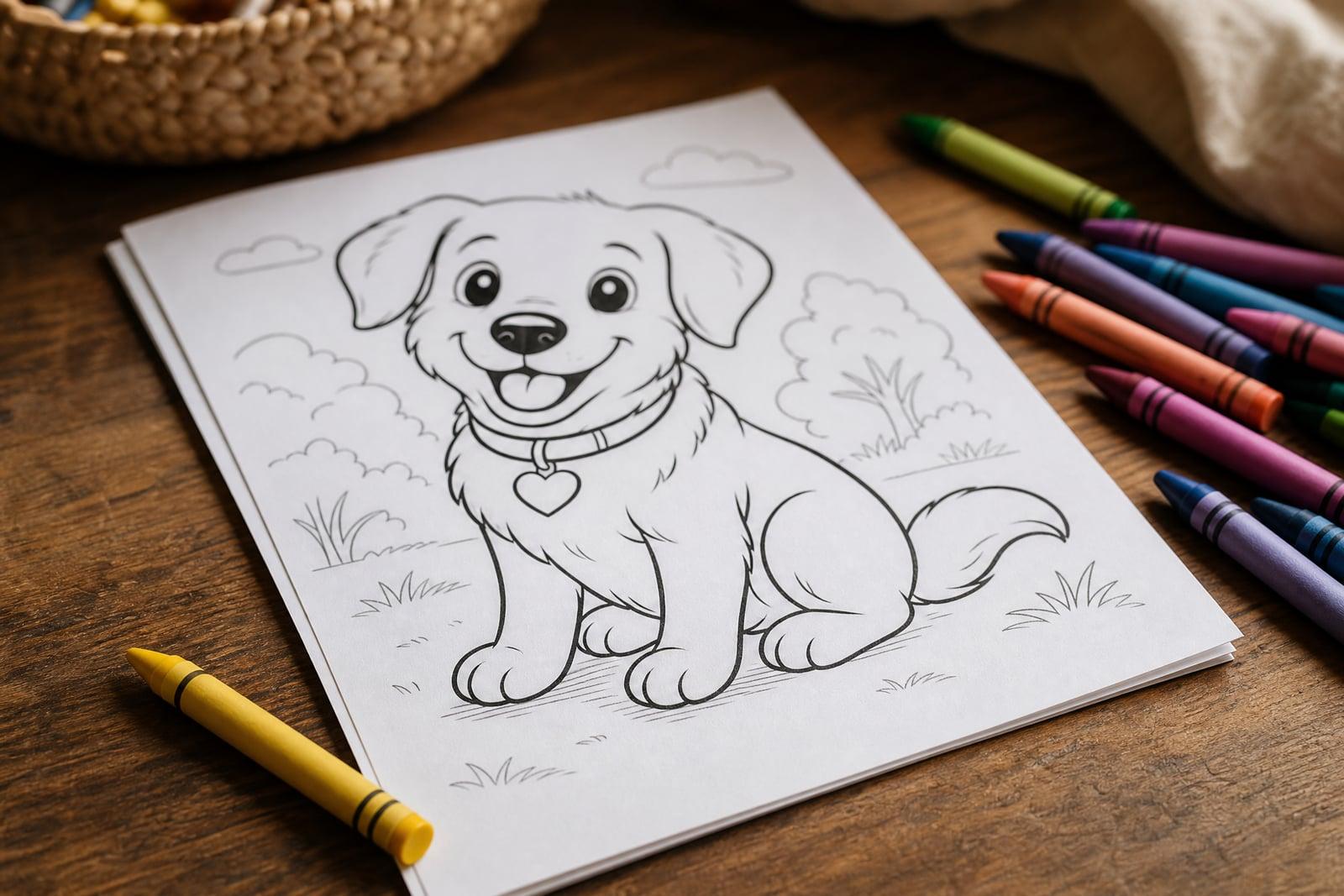
The Coloring Page Generator turns any photo into a printable coloring book page. Upload a picture of your kid, your dog, or a family vacation moment, and it redraws the scene as clean black outlines on a white background. Print the result and hand it over with crayons. Parents use it for rainy afternoons, teachers for classroom activities, and adults for their own colored-pencil sessions.
What is the Coloring Page Generator?
The Coloring Page Generator is a photo-to-line-art tool. You upload one image and it converts the scene into bold, closed outlines with the shading and color stripped away, the same look as a page from a printed coloring book. Faces stay recognizable, which is the fun part: kids can color themselves, their pets, and their grandparents instead of yet another generic cartoon animal.
Converting a photo to colorable line art is harder than running an edge filter. Filters leave broken lines, gray smudges, and backgrounds too noisy to color inside. The generator makes editorial decisions instead: it closes the shapes, drops the clutter, thickens lines for small hands, and keeps the white space open, so the page actually works with crayons and markers on real paper.
Coloring Page Generator features
Closed, colorable shapes
Lines connect and regions close, so crayon colors stay where kids put them. Edge-filter apps leave gaps and gray noise; this tool draws the page the way a coloring book illustrator would.
Recognizable people and pets
The outline keeps the features that make your subject who they are: glasses, curls, a dog's floppy ear. Kids light up when the page they are coloring is clearly their own family.
Print-ready simplicity
Pages come out as clean black lines on a white background, so they print crisply on any cheap home printer and photocopy well for teachers running off a full classroom set.
Adjustable detail level
Simple, chunky outlines suit toddlers; finer detail suits older kids and adult colorists. Regenerate to get more or less complexity from the same photo until the difficulty matches the colorist.
How to use the Coloring Page Generator
- 1
Upload a photo
Choose a clear shot with one or two main subjects. Portraits, pets, houses, and cars convert best. Very busy scenes turn into crowded pages, so crop before uploading.
- 2
Pick the detail level
Go simple for young kids and more detailed for adults. When unsure, start simple; a page with too much detail frustrates small hands quickly.
- 3
Generate the page
The photo is redrawn as black outline art in moments. Check that the main subject reads clearly, and regenerate if the background stole too much attention.
- 4
Print and color
Download the page and print it at home on plain paper. Standard printer settings work fine, and you can reprint the same page as many times as the crayons demand.
Coloring Page Generator details
| Best for | Parents and teachers turning family or class photos into coloring pages |
|---|---|
| Category | Fun & creative |
| Powered by | Nano Banana (Google) |
| Credits per image | 20 credits at 1K |
| Photos you upload | Photo to convert |
| Aspect ratios | 3:4, 1:1, 4:3 |
| Adjustable options | None, one-click result |
| Included in plans | Standard, Premium, Pro |
What people make with the Coloring Page Generator
Rainy-day kids activities
Turn this morning's pancake disaster or the family dog into an afternoon activity. Kids color differently when the page is their own life instead of a generic cartoon from a store-bought book.
Classroom worksheets
Teachers can convert field trip photos, the class pet, or the school building into coloring sheets. A page of the actual classroom hamster beats a clip-art animal for engagement every single time.
Party favors
Make coloring pages of the birthday kid for the party table. A stack of printed pages and a bucket of crayons keeps a table of six-year-olds busy while the adults talk.
Memory projects
Coloring an old family house or a pet who has passed is a gentle way to sit with a memory. Personalized pages give kids and adults a quiet, hands-on way to remember someone.
Coloring Page Generator FAQ
What photos work best in the Coloring Page Generator?
Clear photos with one or two subjects and decent lighting. Portraits, pets, vehicles, and buildings convert cleanly. Group shots work, but each face gets less detail, and cluttered backgrounds become crowded pages, so crop to the subject before uploading.
Will the page still look like my kid?
Yes, within the limits of line art. The generator keeps hairstyle, glasses, expression, and other identifying features, so the drawing reads as your child rather than a generic figure. Fine facial detail is simplified on purpose to keep the regions colorable.
Can I make a whole coloring book?
Yes. Convert a batch of photos one at a time, download the pages, and bind or staple them into a book. Family year-in-review books and classroom books are common projects, and you can reprint any page when it gets scribbled beyond saving.
Can I sell coloring pages I make?
Yes, images you generate are yours to use commercially, so printable coloring sets are fair game for online shops. Use photos you have rights to, and get permission before selling pages based on other recognizable people.
Are uploaded family photos private?
Uploads are used only to generate your coloring pages, and results are stored in your private library. Nothing gets shared or published anywhere. You can delete the original photo and every generated page from your account at any time.
Related tools
Pricing
Choose the perfect plan to unlock more creativity with premium AI-powered image generation.
Standard
Perfect for creators and content makers
- 1,500 Credits per month
- High-quality AI image generation
- Text-to-image & image-to-image
- Premium templates library
- Priority support
Premium
For professionals and power creators
- 4,000 Credits per month
- Ultra high-quality generations
- Advanced AI models & styles
- Priority processing & support
- Commercial usage rights
Pro
Most advanced models for premium visuals
- 10,000 Credits per month
- All models incl. Nano Banana PRO
- All resolutions (1K, 2K & 4K)
- Premium-quality generation & smart edits
- Priority processing & support
Need more credits?
All plans include the option to purchase additional credit packs when you need extra generating power. Scale your creativity without limits.
Payments are securely processed by Stripe, our merchant of record. Subscriptions renew automatically at the listed price until you cancel; cancel anytime in your account settings. By continuing you agree to our Terms, Privacy Policy and Refund & Cancellation Policy. Need help? Contact support@nanobananai.ai.