Style transforms
Marble Statue: carve yourself into classical stone
Turns a portrait into a classical marble sculpture for dramatic avatars, prints, and gifts with gravitas.
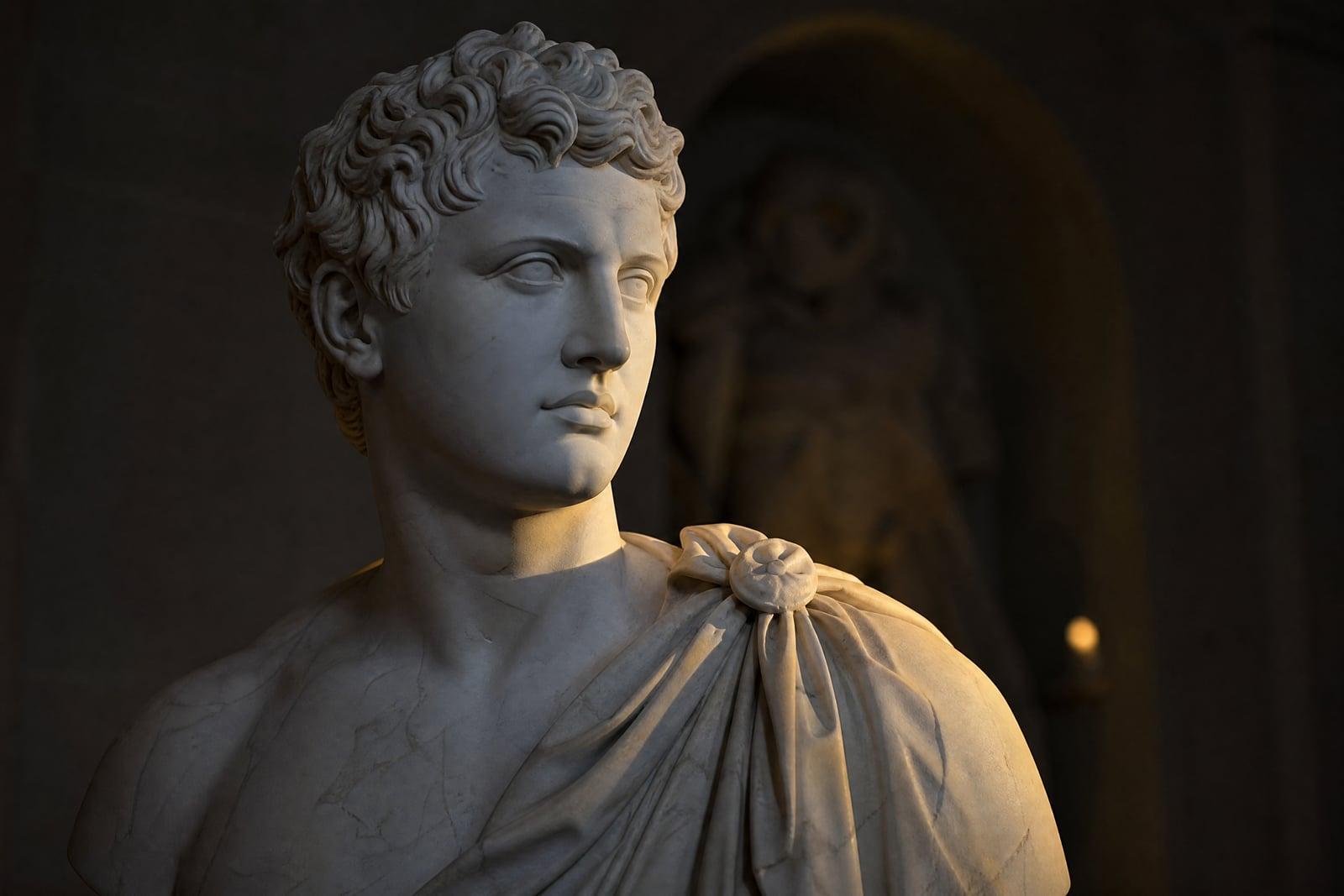
Marble Statue turns a photo you upload into a classical marble sculpture, carved in the style of antiquity and lit like a museum piece. Upload one portrait and generate. Your features come back chiseled in white stone with subtle veining, carved hair, and sculpted drapery. The result saves to your library, where you can rerun it with a different pose or crop.
What is the Marble Statue?
The tool reads your photo and re-imagines you as sculpted stone: skin becomes polished marble, hair becomes carved curls, clothing becomes classical drapery folds. You upload one photo, generate, and download. It suits straight-on and three-quarter portraits best, and it turns even a casual selfie into something that looks excavated from a villa. Generation is quick, and each rerun carves a slightly different pose.
Marble is unforgiving to fake. Real sculpture has crisp chisel transitions, soft light scattering inside the stone, and veining that flows with the form instead of sitting on top like a texture sticker. The tool renders those properties while preserving your bone structure, brow line, and expression, which is what keeps the statue recognizably you rather than a generic bust.
Marble Statue features
Convincing stone
Polished surfaces, a subtle inner glow, and natural veining make the marble read as carved rock under gallery light. Gray-skin filter effects are exactly what this avoids. The stone reads as heavy, which is the entire illusion.
Your bone structure, carved
The sculpt preserves your jawline, nose, brow, and expression. A statue only lands as a portrait if it is unmistakably your face in stone. Even a slight smirk survives the translation into marble.
Classical staging
Results come with museum-style presentation: dark backdrops, dramatic side light, plinth-level framing. The whole image reads as a photograph of a real exhibit. Prints inherit that gallery gravity without any extra editing.
Rapid re-carves
Generations are fast. Rerun for a different drapery arrangement, a new angle of light, or a more heroic tilt of the chin. Trying five variations takes less time than naming the file.
How to use the Marble Statue
- 1
Upload a strong portrait
Directional light and a calm expression carve best. Profile and three-quarter angles give the sculpt classical drama. A plain background keeps the carving focused on you.
- 2
Generate the sculpture
One run turns the photo into a lit marble bust. Look at the eyes and hair, where carving detail matters most.
- 3
Adjust with reruns
Regenerate for different drapery, lighting, or stone wear. A weathered finish reads ancient; a polished one reads gallery-new. Both make convincing prints.
- 4
Download and display
Save it from your library. Marble portraits print with real presence, especially large and on matte paper. It also crops well to a square avatar.
Marble Statue details
| Best for | Anyone who has jokingly demanded a statue of themselves |
|---|---|
| Category | Style transforms |
| Powered by | Nano Banana (Google) |
| Credits per image | 20 credits at 1K |
| Photos you upload | Your photo |
| Aspect ratios | 3:4, 1:1 |
| Adjustable options | None, one-click result |
| Included in plans | Standard, Premium, Pro |
What people make with the Marble Statue
Statement profile pictures
A marble bust of your own face is equal parts absurd and magnificent, which is exactly the register a memorable avatar needs. It works on professional platforms exactly because it should not.
Gifts with a wink
Immortalize the friend who "deserves a statue" and hand them exactly that. It flatters and teases in the same frame. Print it on canvas and watch them fail to keep a straight face.
Home and office prints
A sculpted family portrait in a classical frame is a conversation piece that guests assume came from a photoshoot with a very expensive concept. Nobody has to know it started as a phone selfie.
History and classics fans
Teachers, students, and antiquity nerds turn themselves into Greco-Roman busts for presentations, club branding, and course materials with actual personality. A self-portrait bust makes a better slide opener than any stock photo.
Marble Statue FAQ
How do I turn my photo into a marble statue?
Upload one clear portrait to the Marble Statue tool and generate. Your face and clothing are re-rendered as carved, polished stone with classical drapery and museum lighting. It finishes in seconds, and you can regenerate for different poses and finishes.
Will the statue keep my facial features?
Yes. The carving preserves your bone structure, nose, brows, and expression, so the bust reads as a portrait of you rather than a stock Greek head. Strong, directional light in the source photo helps the stone version hold your likeness.
Can I choose between clean and weathered marble?
You can steer it. Rerunning varies the finish: some takes come back polished and gallery-fresh, others cracked and weathered like an excavated piece. Generate a few and pick the era that fits the mood. The weathered takes pair well with dramatic lighting.
What kind of photo works best?
A sharp portrait with light coming from one side, since sculpture is all shadow and form. Neutral backgrounds help. Sunglasses and busy patterns confuse the carving, so remove the shades and favor simple clothing that can become drapery.
Can I use my statue image commercially?
Yes, images you generate are yours, including for commercial use: album art, posters, branding, merch. The classical style itself is thousands of years out of copyright, so lean into it. Credit is not required, though people will ask how you made it.
Related tools
Pricing
Choose the perfect plan to unlock more creativity with premium AI-powered image generation.
Standard
Perfect for creators and content makers
- 1,500 Credits per month
- High-quality AI image generation
- Text-to-image & image-to-image
- Premium templates library
- Priority support
Premium
For professionals and power creators
- 4,000 Credits per month
- Ultra high-quality generations
- Advanced AI models & styles
- Priority processing & support
- Commercial usage rights
Pro
Most advanced models for premium visuals
- 10,000 Credits per month
- All models incl. Nano Banana PRO
- All resolutions (1K, 2K & 4K)
- Premium-quality generation & smart edits
- Priority processing & support
Need more credits?
All plans include the option to purchase additional credit packs when you need extra generating power. Scale your creativity without limits.
Payments are securely processed by Stripe, our merchant of record. Subscriptions renew automatically at the listed price until you cancel; cancel anytime in your account settings. By continuing you agree to our Terms, Privacy Policy and Refund & Cancellation Policy. Need help? Contact support@nanobananai.ai.