Style transforms
Mosaic Art from your photo, tile by tiny tile
Rebuild any photo as a classical mosaic made of small stone and glass tiles.
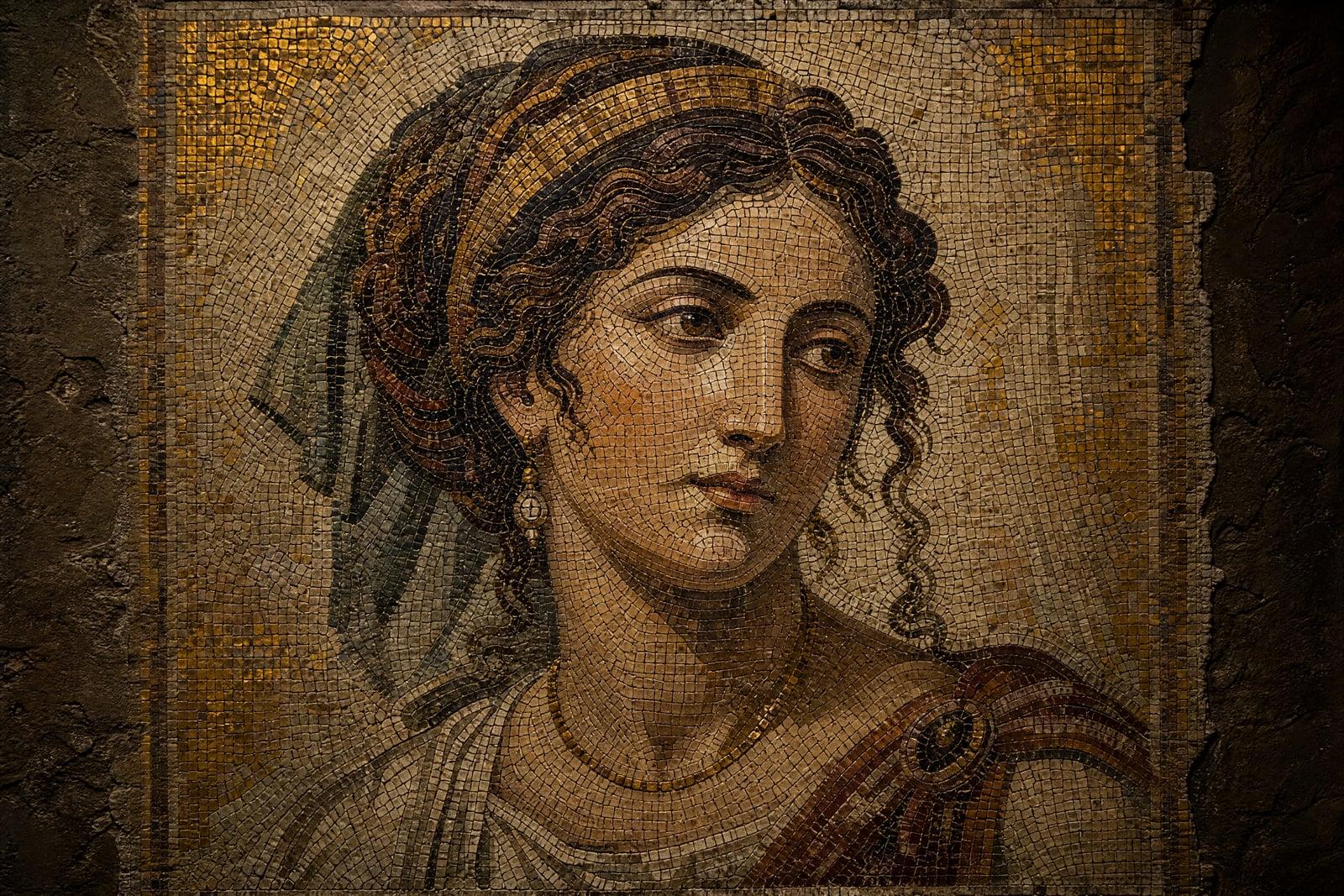
Mosaic Art rebuilds a photo you upload as a tiled mosaic: thousands of small stone, ceramic, or glass pieces set in grout, arranged so they resolve into your image at a distance. Upload one photo, generate, and a portrait or pet becomes something that looks excavated from a Roman villa or lifted off a subway wall, depending on the treatment you pick.
What is the Mosaic Art?
The tool works from a single photo. It converts the image into individually visible tiles, complete with grout lines, slight misalignment, and the surface variation of real stone and glass. You can steer the material and era: ancient Roman with weathered marble, Byzantine with gold accents, or a bright modern ceramic look. The finished mosaic saves to your library for download.
A real mosaic is an exercise in resolution. Each tile holds one color, so the artist must decide which details deserve tiles and which dissolve into texture. Automated photo-mosaic filters place tiles on a rigid grid and lose the craft. The generator lays tiles the way mosaicists do, following contours around eyes and edges in flowing courses, so the image feels set by hand.
Mosaic Art features
Hand-set tile flow
Tiles follow the contours of the subject, curling around eyes and along outlines the way real mosaicists lay their courses. Nothing sits on the rigid grid that gives cheap filters away instantly.
Material and era choices
Weathered Roman marble, gold-backed Byzantine glass, or bright modern ceramic: the material changes the whole read of the piece. Grout tone and tile wear shift to match the era you pick.
Distance magic
Up close the image is pure texture; a few steps back it snaps into a face. That resolve-at-a-distance quality survives printing, which makes large formats especially satisfying to hang in a hallway.
Detail where it counts
Smaller tiles cluster around faces and focal points while backgrounds relax into larger pieces, exactly how a craftsman would budget the effort. Likeness holds even though every element is a colored chip.
How to use the Mosaic Art
- 1
Upload your photo
Choose a photo with a bold subject and clear contrast. Mosaic eats fine detail by design, so a strong face or silhouette matters more than sharpness.
- 2
Pick a material era
Roman stone, Byzantine gold, or modern ceramic. Mention grout color or tile size if you have a preference; chunkier tiles read as more ancient.
- 3
Generate
The mosaic renders quickly. Zoom in to enjoy the tile work, then zoom out to confirm the image resolves; both views should reward you.
- 4
Download or refine
Save the piece or regenerate with a different material. The same portrait in weathered marble and in gold glass makes two very different gifts.
Mosaic Art details
| Best for | People who want a photo turned into ancient-looking tile art |
|---|---|
| Category | Style transforms |
| Powered by | Nano Banana (Google) |
| Credits per image | 20 credits at 1K |
| Photos you upload | Your photo |
| Aspect ratios | Follows the input image |
| Adjustable options | None, one-click result |
| Included in plans | Standard, Premium, Pro |
What people make with the Mosaic Art
Tiled mural previews
Homeowners preview a real tiled mural of their own design before hiring anyone. A mosaic mock-up generated from a photo of the actual wall makes contractor conversations concrete and quotes more accurate.
Ancient-style pet portraits
A cat rendered as a Roman floor mosaic, complete with weathered marble, is a gift that gets a laugh and then a frame. The beware-of-dog mosaic tradition is two thousand years old.
Travel and history lovers
A photo from a trip to Italy or Istanbul, rebuilt as period mosaic, becomes a souvenir with more soul than a fridge magnet. It prints well at hallway size and ages better too.
Cafe and shop walls
Small businesses print mosaic versions of their storefront or signature dish as decor that suits tiled interiors. The style also photographs well when customers post the room on their feeds.
Mosaic Art FAQ
How does Mosaic Art keep my photo recognizable?
It sizes tiles by importance: small precise tiles around faces and edges, larger relaxed ones in the background. Color placement does the rest. Stand back or squint and the image resolves cleanly; that distance effect is exactly how physical mosaics work.
Can I choose the tile material and era?
Yes. Ask for weathered Roman stone, Byzantine glass with gold, or clean modern ceramic, and mention tile size or grout tone if you care. Each material changes the palette and the mood of the finished piece.
What photos make good mosaics?
Bold, high-contrast subjects: portraits, pets, landmarks, a single flower. Since every detail becomes a tile, fine textures and busy crowds turn muddy. If in doubt, crop tighter on the subject and let the background become simple tile filler.
Is this the same as those collages made of tiny photos?
No. Photo-collage mosaics assemble your image from thousands of small photographs. This renders your photo as a physical tile mosaic, with stone, glass, grout, and hand-laid flow. The output looks like a crafted object, and it prints like one.
Can I use mosaics commercially?
Yes, anything you generate is yours to use, including on products and in client work. Interior designers and print sellers use the style freely. If a fabricator later builds the design in real tile, that arrangement is between you and them.
Related tools
Pricing
Choose the perfect plan to unlock more creativity with premium AI-powered image generation.
Standard
Perfect for creators and content makers
- 1,500 Credits per month
- High-quality AI image generation
- Text-to-image & image-to-image
- Premium templates library
- Priority support
Premium
For professionals and power creators
- 4,000 Credits per month
- Ultra high-quality generations
- Advanced AI models & styles
- Priority processing & support
- Commercial usage rights
Pro
Most advanced models for premium visuals
- 10,000 Credits per month
- All models incl. Nano Banana PRO
- All resolutions (1K, 2K & 4K)
- Premium-quality generation & smart edits
- Priority processing & support
Need more credits?
All plans include the option to purchase additional credit packs when you need extra generating power. Scale your creativity without limits.
Payments are securely processed by Stripe, our merchant of record. Subscriptions renew automatically at the listed price until you cancel; cancel anytime in your account settings. By continuing you agree to our Terms, Privacy Policy and Refund & Cancellation Policy. Need help? Contact support@nanobananai.ai.