Style transforms
Vintage Film Look that makes new photos feel like old prints
Regrade any photo into a convincing film print from the era you choose.
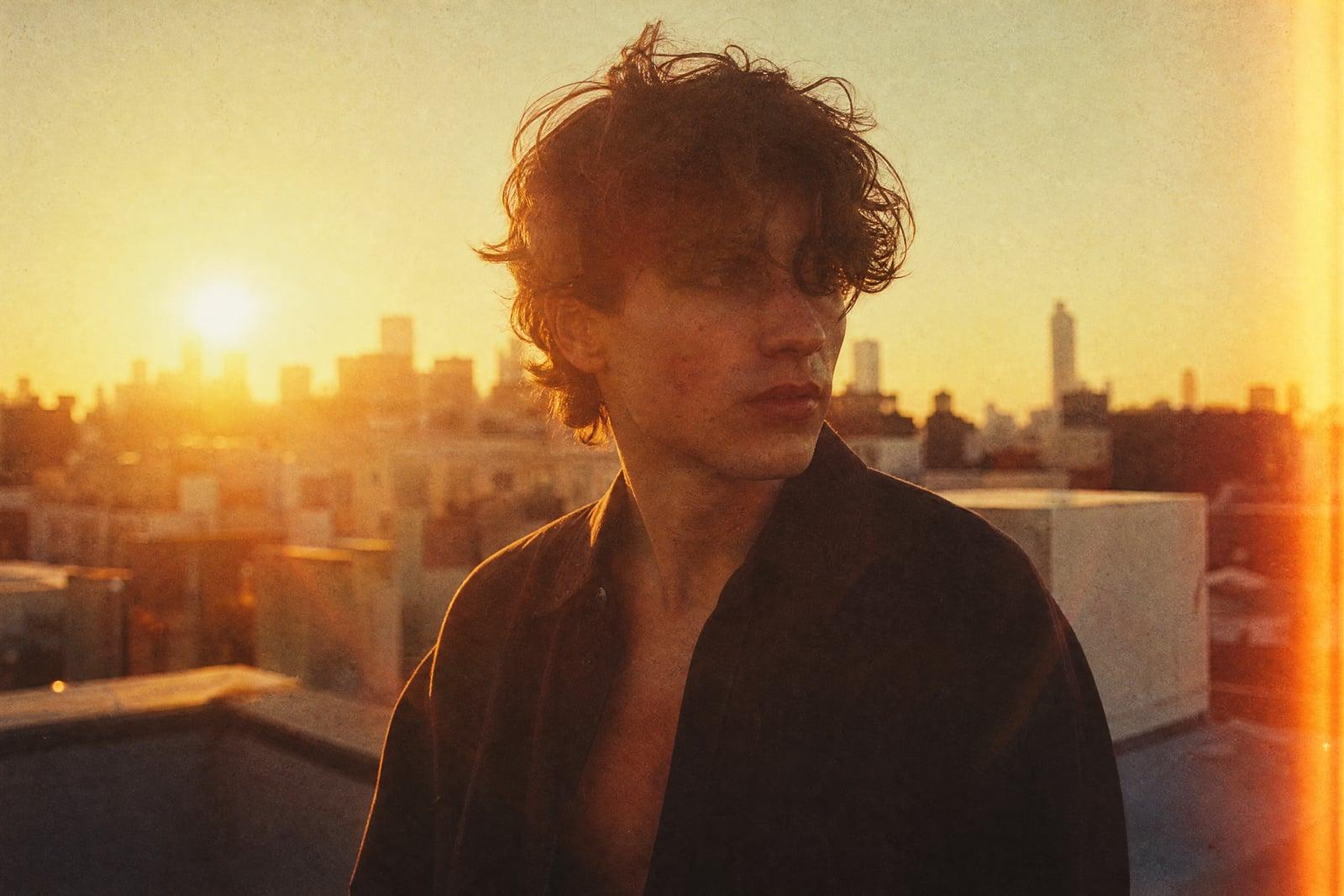
Vintage Film Look takes a photo you upload and regrades it to look like it was shot on old film stock. Grain, muted color, light leaks, and the soft glow of a decades-old print all come through in the result. You pick the era or mood you want, generate, and download. Digital phone photos come out looking like they were pulled from a shoebox of prints.
What is the Vintage Film Look?
The tool is a one-photo transform. You upload any image, a portrait, a street shot, a picture of your dog, and describe the film feel you are after: 70s Kodachrome warmth, 90s disposable-camera flash, faded Polaroid pastels. The generator rebuilds the image with that grading baked in, then saves it to your library where you can download it or run more variations on the same shot.
Faking film in an editor is harder than stacking a filter. Real film has grain that varies with brightness, halation around highlights, slightly crushed shadows, and color shifts that depend on the stock. A preset applies one uniform wash and usually looks like a filter. The tool models those quirks per image, so the vignette, grain, and color response sit where film would actually put them.
Vintage Film Look features
Era-accurate grading
Ask for a specific decade and the color response follows: warm 70s saturation, washed 80s tones, or the hard flash and green shadows of a 90s point-and-shoot. Each era reads distinct rather than generically old.
Grain that behaves like film
Grain sits heavier in the midtones and shadows and lighter in blown highlights, the way real emulsion works. It looks organic at full size instead of like a noise layer pasted on top of the photo.
Keeps your subject intact
Faces, buildings, and text on signs stay where they were. The transform changes color, texture, and light falloff, not the content of the shot, so friends still look like themselves in the retro version.
Fast variations
Each generation takes seconds, so you can try a faded 60s print, then a light-leaked disposable-camera look, then a moody Polaroid, and keep whichever one fits your feed or your wall.
How to use the Vintage Film Look
- 1
Upload your photo
Any clear photo works. Sharp, well-lit images give the film grading more to work with; a picture that is already blurry will just come back blurry and grainy.
- 2
Pick an era or stock feel
Describe the mood you want: 70s warm slide film, faded Polaroid, or disposable-camera flash from the 90s. The more specific the era, the more convincing the result.
- 3
Generate
The regraded photo appears in your library after a few moments. If the tone is too heavy or too subtle, regenerate; each pass is quick and gives a fresh take.
- 4
Download or refine
Save the version you like, or tweak your era description and run it again. Many people generate three or four decades of the same shot to compare.
Vintage Film Look details
| Best for | Creators who want a real film feel without a film camera |
|---|---|
| Category | Style transforms |
| Powered by | Nano Banana (Google) |
| Credits per image | 20 credits at 1K |
| Photos you upload | Your photo |
| Aspect ratios | Follows the input image |
| Adjustable options | Film style |
| Included in plans | Standard, Premium, Pro |
What people make with the Vintage Film Look
Instagram feed with a mood
Creators who keep a consistent retro grid can run every phone photo through the same era treatment. The grain and palette stay coherent across posts without buying a preset pack or hunting down an old camera.
Wedding and event recaps
A film-look edit of the best shot from a wedding or birthday makes a caption-ready recap image. The nostalgia grading suits throwback captions and anniversary posts better than a clean digital photo does.
Album art and posters
Musicians and podcasters use faded 70s or grungy 90s treatments to give cover images and gig posters a period feel that matches the sound of the project, without licensing archive photography.
Family photos that match
When you print new photos to sit beside scanned prints from the 80s in one album, running the new ones through a matching film treatment keeps the spread from looking half digital.
Vintage Film Look FAQ
What does the Vintage Film Look tool actually change in my photo?
It regrades color, adds era-appropriate grain, softens highlights with halation, and can add light leaks or vignetting. The content of the photo, the people, the framing, the background, stays the same. Think of it as reshooting the same moment on old film rather than editing the subject.
Can I choose a specific decade or film stock feel?
Yes. Describe the era or the look in plain words, warm 70s slide film, faded Polaroid, 90s disposable flash, and the grading follows. You do not need to know real stock names; a phrase like sun-bleached 80s beach photo works fine.
Will faces still be recognizable after the film treatment?
Yes. The transform is about color and texture, so faces keep their features. Heavy grain settings can soften fine detail slightly, which is exactly what real film did, but people in the photo remain clearly themselves.
Can I use the vintage versions commercially?
Yes. Images you generate are yours to use, including in client work, album art, or products you sell. If the original photo shows other people, the usual model-release considerations for commercial photography still apply to you as the publisher.
How is this different from an Instagram filter?
A filter applies one fixed overlay to every photo. This tool rebuilds the grading per image, so grain density, halation, and color shifts respond to what is actually in your shot. Two different photos get two different treatments that both read as the same era.
Related tools
Pricing
Choose the perfect plan to unlock more creativity with premium AI-powered image generation.
Standard
Perfect for creators and content makers
- 1,500 Credits per month
- High-quality AI image generation
- Text-to-image & image-to-image
- Premium templates library
- Priority support
Premium
For professionals and power creators
- 4,000 Credits per month
- Ultra high-quality generations
- Advanced AI models & styles
- Priority processing & support
- Commercial usage rights
Pro
Most advanced models for premium visuals
- 10,000 Credits per month
- All models incl. Nano Banana PRO
- All resolutions (1K, 2K & 4K)
- Premium-quality generation & smart edits
- Priority processing & support
Need more credits?
All plans include the option to purchase additional credit packs when you need extra generating power. Scale your creativity without limits.
Payments are securely processed by Stripe, our merchant of record. Subscriptions renew automatically at the listed price until you cancel; cancel anytime in your account settings. By continuing you agree to our Terms, Privacy Policy and Refund & Cancellation Policy. Need help? Contact support@nanobananai.ai.