Style transforms
Double Exposure: blend your portrait with a living landscape
Merges a portrait and a natural scene into one fine-art silhouette image.
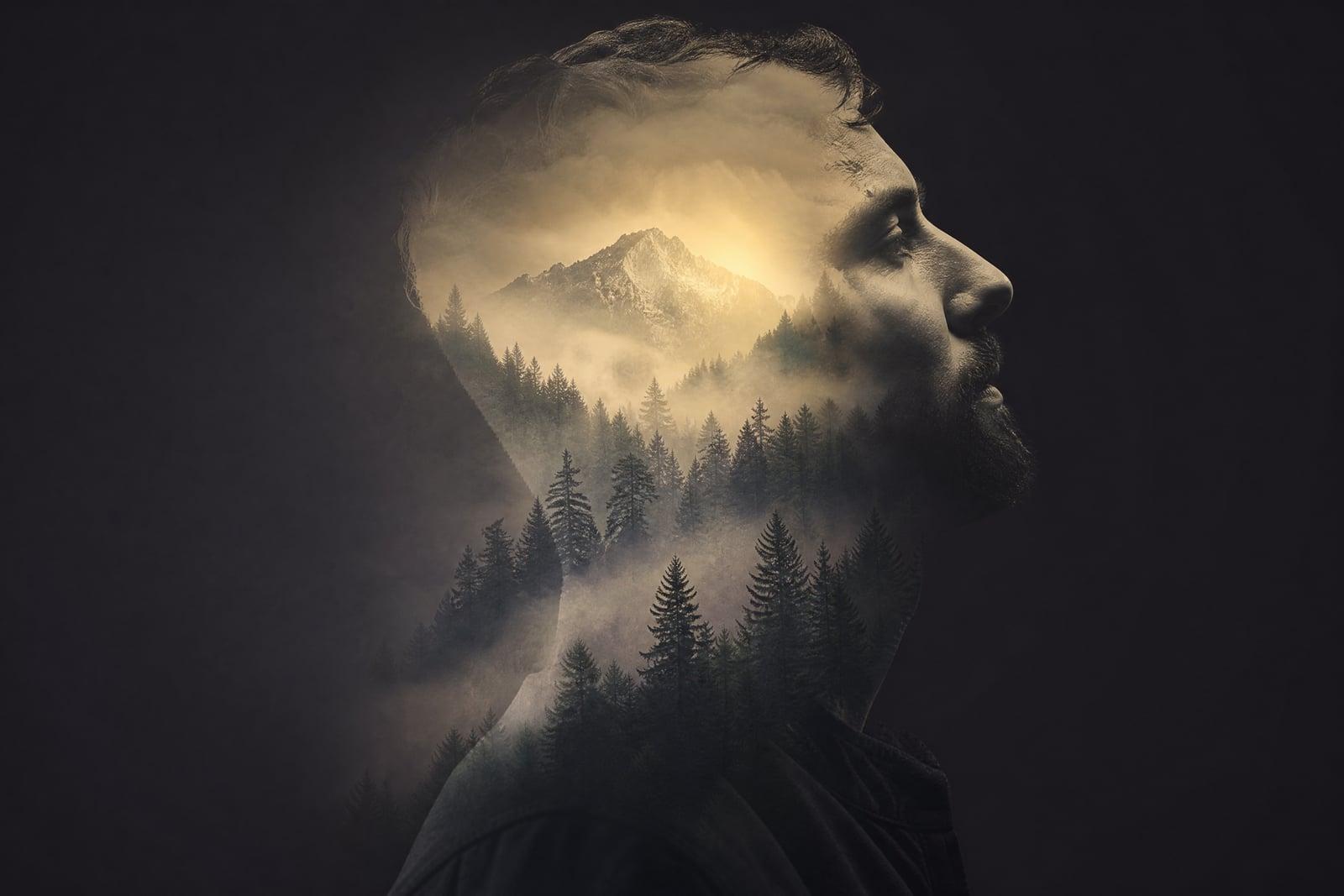
Double Exposure blends your portrait with a natural landscape, pine forests, mountain ridges, ocean waves, inside a single artistic image. Upload one portrait photo and generate. The tool builds the classic fine-art effect where scenery lives inside your silhouette, then saves the finished piece to your library. Rerunning it swaps in new landscapes and blend moods.
What is the Double Exposure?
Double Exposure is a portrait art tool on Nano Banana AI modeled on the old film technique of exposing one frame twice. You upload a portrait, generate, and the tool merges your profile or head-and-shoulders silhouette with a natural scene: trees rising through your shoulders, a ridge line tracing your jaw, mist where your thoughts would be. The output is a single blended fine-art image.
On film, this took luck; in an editor, it takes an evening of masking. The craft is in the blend map: which parts of the face stay solid so the person remains present, where the landscape shows through, and how the two exposures share tones so the seam disappears. The tool computes that map from your actual features, so a tree line can follow your hairline instead of cutting randomly across your face.
Double Exposure features
Feature-aware blending
Landscapes follow your actual contours, with ridgelines tracking the jaw and branches filling the hair, so the merge feels deliberately composed rather than overlaid at random by a phone app.
The face stays present
Eyes and key features keep enough solidity that the portrait reads clearly through the scenery. The result is a person full of forest, never a forest wearing a vague and anonymous head shape.
Varied natural scenes
Reruns pair your silhouette with different environments, misty pines, coastal cliffs, storm clouds, open sky, so you can keep generating until the scenery matches the mood you are actually going for.
Gallery-grade tonality
Blends share one unified tonal palette across both exposures, which is what makes the result look like fine-art photography instead of a novelty overlay. Monochrome versions in particular print like gallery work.
How to use the Double Exposure
- 1
Upload a portrait
Profile shots and head-and-shoulders photos with a plain, light background give the cleanest silhouette for the landscape to inhabit. Tie back loose hair if you want a crisper outline.
- 2
Generate the blend
The tool merges a natural scene into your silhouette. Notice where the landscape follows your features; that alignment is what sells the effect.
- 3
Explore other scenes
Regenerate to try new environments and blend intensities. A forest blend reads contemplative, waves read restless, and mountains read resolute, so match the scenery to the story you are telling.
- 4
Download and display
Save the strongest version. Double exposures make striking profile pictures, album art, and large monochrome prints for a hallway wall.
Double Exposure details
| Best for | Musicians and portrait lovers who want fine-art blended imagery. |
|---|---|
| Category | Style transforms |
| Powered by | Nano Banana (Google) |
| Credits per image | 20 credits at 1K |
| Photos you upload | Portrait photo |
| Aspect ratios | 3:4, 1:1 |
| Adjustable options | Blend with |
| Included in plans | Standard, Premium, Pro |
What people make with the Double Exposure
Album and single art
Musicians blend their portrait with storm clouds or pine forest for cover art that carries the record's mood without a single word of typography. The style suits folk, ambient, and post-rock releases especially well.
Memorial portraits
A loved one's silhouette filled with the coastline they adored becomes a quiet, beautiful remembrance piece. Families print it for a service or keep a small framed version at home by the door.
Author and creative headshots
Writers and therapists use a softened double exposure as a bio image when a plain corporate headshot feels wrong for their work. It reads thoughtful without trying too hard, which is exactly the brief.
Statement wall prints
A large monochrome double exposure of your own profile blended with your favorite hiking range is the rare self-portrait that does not feel vain on a wall. Guests ask about the mountains, not the face.
Double Exposure FAQ
What is a double exposure image?
It is a single image made by merging two exposures, classically a portrait and a landscape, so the scenery appears inside the person's silhouette. The technique started as a film accident that photographers learned to control. This tool recreates the controlled version digitally from one uploaded portrait.
Do I need to upload two photos, one portrait and one landscape?
No, just the portrait. The tool supplies and blends the natural scenery itself, matched to your silhouette and tones. Each regeneration pairs you with a different landscape, so you effectively browse scenes by rerunning rather than by hunting for a second photo.
What kind of portrait works best for the Double Exposure effect?
A profile or head-and-shoulders shot against a plain, light background. Strong silhouette edges give the landscape a clear boundary to live inside. Hats, big collars, and busy backgrounds blur that boundary and weaken the blend, so keep the outline simple.
Can I choose which landscape appears in my silhouette?
You steer it by regenerating: each run draws a different natural scene, forest, mountains, sea, sky, and most people land on one they love within a few passes. Runs are quick, so exploring the range takes a minute or two rather than an editing session.
Can I print and sell double exposure artwork I make here?
Yes, generated images are yours to use commercially, covers, prints, and client commissions included. Use portraits you have rights to, which for commissions means your client's own photo submitted with their blessing, and keep a copy of that permission for your records.
Related tools
Pricing
Choose the perfect plan to unlock more creativity with premium AI-powered image generation.
Standard
Perfect for creators and content makers
- 1,500 Credits per month
- High-quality AI image generation
- Text-to-image & image-to-image
- Premium templates library
- Priority support
Premium
For professionals and power creators
- 4,000 Credits per month
- Ultra high-quality generations
- Advanced AI models & styles
- Priority processing & support
- Commercial usage rights
Pro
Most advanced models for premium visuals
- 10,000 Credits per month
- All models incl. Nano Banana PRO
- All resolutions (1K, 2K & 4K)
- Premium-quality generation & smart edits
- Priority processing & support
Need more credits?
All plans include the option to purchase additional credit packs when you need extra generating power. Scale your creativity without limits.
Payments are securely processed by Stripe, our merchant of record. Subscriptions renew automatically at the listed price until you cancel; cancel anytime in your account settings. By continuing you agree to our Terms, Privacy Policy and Refund & Cancellation Policy. Need help? Contact support@nanobananai.ai.