Style transforms
Pop Art Generator: your photo in bold 60s color
Turn a photo into punchy pop art with halftone dots, thick outlines, and loud flat color.
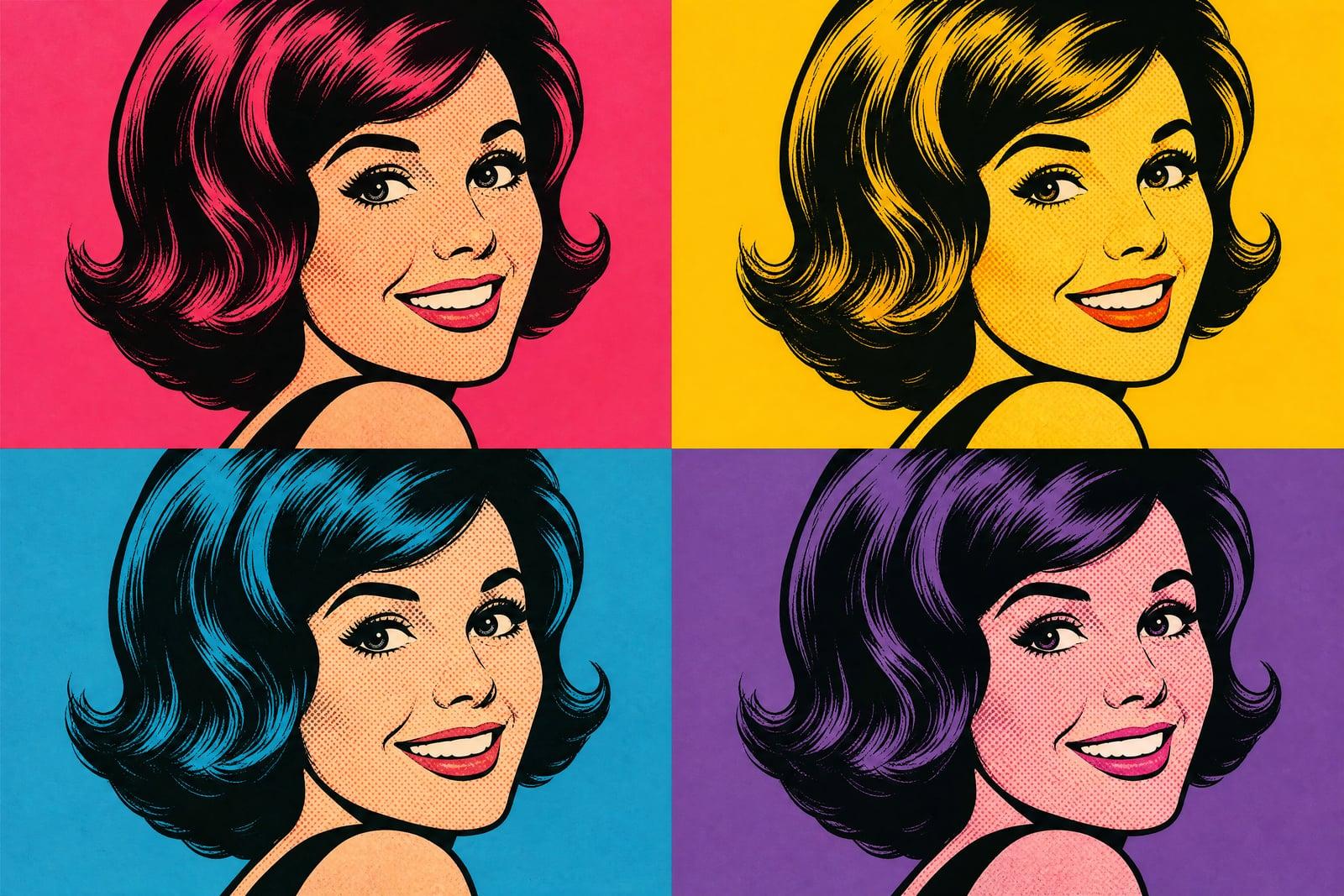
Pop Art Generator remakes a photo you upload as bold 1960s pop art: flat saturated color, halftone dot shading, thick black outlines, and that screen-printed gallery poster energy. Upload one photo, choose a single panel or a colorful multi-panel grid, and generate. Portraits are the classic move, but pets, sneakers, and cars work just as well.
What is the Pop Art Generator?
You upload one photo and pick how loud you want it. The generator flattens the image into blocks of saturated color, adds halftone dots in the shadows, and inks the outlines, following the visual grammar of 60s screen printing. Ask for a single hero image or a grid of panels where the same face repeats in different color schemes. Everything saves straight to your library.
Doing this properly by hand means tracing the photo, separating it into color layers, and rebuilding shading as dot patterns, which is an evening of vector work per image. The generator makes the judgment calls that sell the style: where to simplify a face into three tones, where dots read as shadow, and which colors clash in exactly the right way.
Pop Art Generator features
Halftone done right
Dot shading lands where screen printing would put it, scaling with the shadows instead of tiling evenly across the image. It is the detail that separates real pop art from a posterize filter.
Multi-panel grids
Ask for two, four, or six panels and the same portrait repeats in different color schemes, composed as one printable piece. The repeated-image grid is the most requested pop art format for a reason.
Faces keep their punch
The style strips a portrait down to a few tones and strong lines, and the likeness survives the simplification. Your grin, glasses, and hair read instantly, which is what makes the piece yours.
Loud color, your call
Steer the palette toward hot pinks and cyans, primary comic tones, or one accent color over black and white. Regenerating with a new scheme takes moments, so you can compare several before printing.
How to use the Pop Art Generator
- 1
Upload your photo
High-contrast portraits convert best. A clear face against a plain background gives the generator strong shapes to flatten into color blocks and outlines.
- 2
Choose panels and palette
Decide between one big image or a repeating grid, and mention colors if you care: electric pink and teal, classic primaries, or something moodier.
- 3
Generate
The pop art version renders fast. Check that the outlines caught your key features; if the simplification went too far, regenerate or try a tighter crop.
- 4
Download or refine
Save the winner or spin up more color variations. Grids of the same face in four palettes print well as one large piece for a wall.
Pop Art Generator details
| Best for | People who want loud, printable pop art from a photo |
|---|---|
| Category | Style transforms |
| Powered by | Nano Banana (Google) |
| Credits per image | 20 credits at 1K |
| Photos you upload | Your photo |
| Aspect ratios | 1:1, 3:4 |
| Adjustable options | None, one-click result |
| Included in plans | Standard, Premium, Pro |
What people make with the Pop Art Generator
Apartment wall art
A four-panel pop art print of yourself, your partner, or the dog is loud and cheap to frame, and it reliably starts conversations in a living room or home office.
Band and event posters
DJs and small venues run promo photos through the generator for gig posters and social banners in one pass. The style survives aggressive cropping and stays readable even at thumbnail size.
Birthday and retirement gifts
A pop art grid of the guest of honor, printed large, doubles as party decoration and gift. Offices pitch in for a retirement version of the boss more often than you would think.
Shop merch mockups
The bold flat colors print cleanly on shirts, totes, and mugs, so sellers use pop art portraits and pet panels as merch designs that reproduce without fussy gradients at any print size.
Pop Art Generator FAQ
What is the Pop Art Generator best at?
Portraits, human or pet. The style was built around faces, and the generator leans into that with strong outlines, simplified tones, and halftone shadows. Objects with clear silhouettes, sneakers, guitars, cars, also convert well. Busy landscapes are the weakest input.
Can I get the classic four-panel repeating grid?
Yes, just ask for it. The same image repeats with a different color scheme per panel, composed as one printable piece. Two-panel and six-panel layouts work too if four is not your number, and bigger grids can fill a whole gallery wall from one photo.
Will I still be recognizable in pop art style?
Yes. The simplification keeps the shapes that identify you: hairline, glasses, jaw, smile. If a generation flattens away something important, a tighter crop of your face in the source photo usually fixes it. Friends will recognize you across the room.
Can I put the results on shirts and mugs to sell?
You can. Images you generate are yours to use commercially, and flat pop art color is friendly to print-on-demand products. Use your own photos or photos of people who have agreed, and you are on solid ground.
What makes this different from a posterize filter?
Posterize reduces colors mechanically and looks like it. The generator makes stylistic decisions: inked outlines, halftone dots scaled to the shadows, deliberate color clashes, panel composition. The output imitates the whole printmaking process behind pop art rather than only reducing colors.
Related tools
Pricing
Choose the perfect plan to unlock more creativity with premium AI-powered image generation.
Standard
Perfect for creators and content makers
- 1,500 Credits per month
- High-quality AI image generation
- Text-to-image & image-to-image
- Premium templates library
- Priority support
Premium
For professionals and power creators
- 4,000 Credits per month
- Ultra high-quality generations
- Advanced AI models & styles
- Priority processing & support
- Commercial usage rights
Pro
Most advanced models for premium visuals
- 10,000 Credits per month
- All models incl. Nano Banana PRO
- All resolutions (1K, 2K & 4K)
- Premium-quality generation & smart edits
- Priority processing & support
Need more credits?
All plans include the option to purchase additional credit packs when you need extra generating power. Scale your creativity without limits.
Payments are securely processed by Stripe, our merchant of record. Subscriptions renew automatically at the listed price until you cancel; cancel anytime in your account settings. By continuing you agree to our Terms, Privacy Policy and Refund & Cancellation Policy. Need help? Contact support@nanobananai.ai.