Fun & creative
Cake Design Ideas: see the cake before anyone bakes it
Describe the occasion and the style, and get a realistic picture of the finished cake to share with your baker.
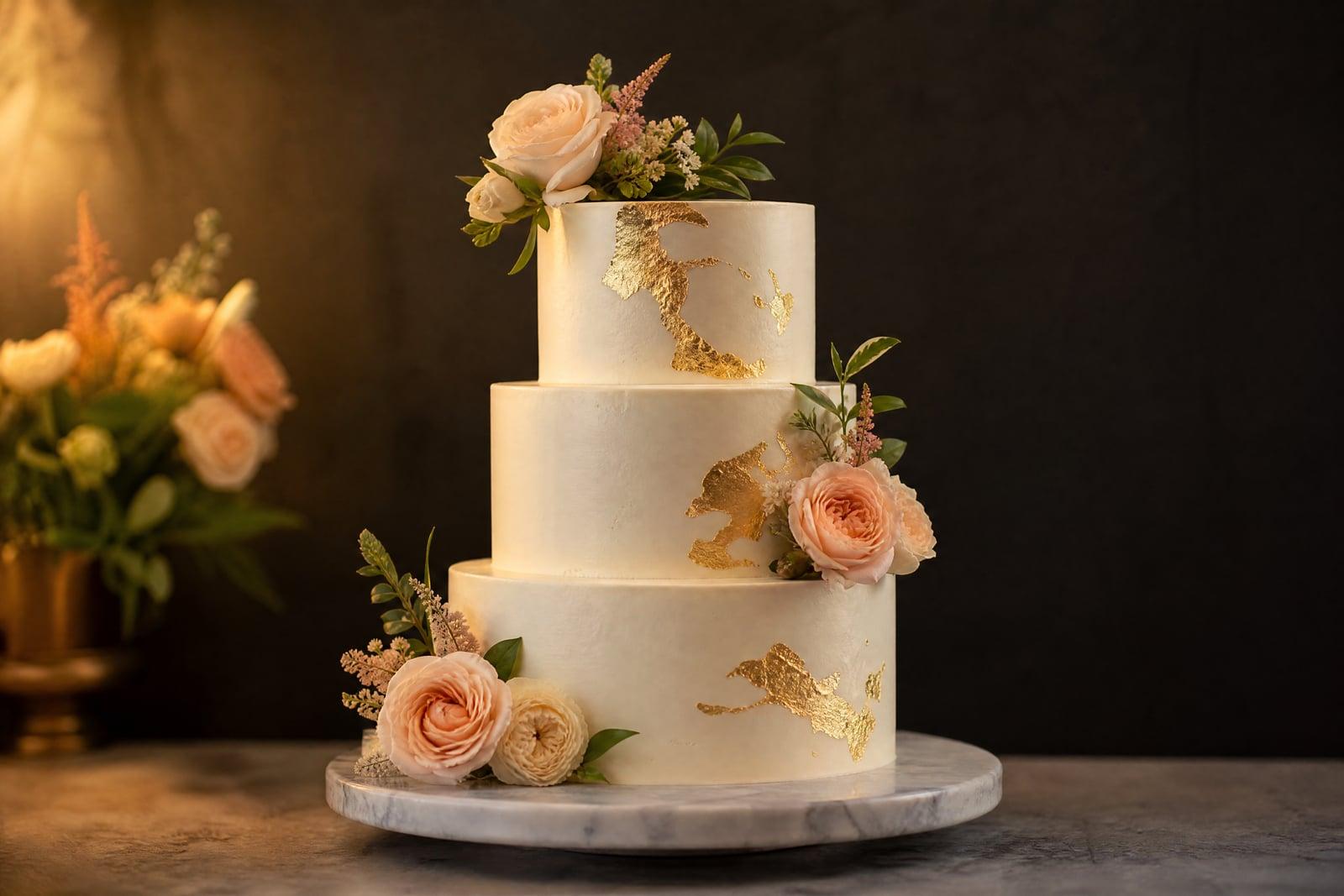
Cake Design Ideas turns a written brief into a realistic picture of a finished cake. Describe the occasion, the tiers, the colors, and the decorations, then generate a concept you can actually look at. Nothing needs uploading, the whole design starts from text. Bakers use it to align with clients before quoting, and home bakers use it to decide what to attempt before the flour comes out.
What is the Cake Design Ideas?
Cake Design Ideas is a text-to-image tool for cake concepts. You open it, describe the cake you have in mind, two tiers, sage green buttercream, pressed flowers, a gold topper, pick a style option, and generate. The render shows a photorealistic finished cake as it would sit on the table. Every version saves to your library, so you can build a shortlist and compare them next to each other.
Cakes are commissioned blind more than almost any other custom product. Words like "elegant" and "rustic" mean different things to you and your baker, and the misunderstanding only surfaces at pickup. The tool closes that gap by rendering frosting texture, tier proportions, and decoration density realistically. A picture of semi-naked buttercream with real fig placement settles in one glance what three emails could not.
Cake Design Ideas features
Frosting that looks real
Buttercream ridges, fondant smoothness, ganache drips, and torched meringue each render with their own texture. The concept reads like a bakery photo, which is exactly what your baker needs to see.
Occasion-aware styling
A first birthday smash cake, a golden anniversary tier, and a graduation sheet cake each have their own visual language. Name the occasion in your brief and the design leans the right way.
Compare versions fast
Generate the same brief in three palettes, or the same palette on one, two, and three tiers. Renders are quick, so the shortlist for the family vote takes minutes to build.
A brief your baker can quote
Custom bakers price from specifics. Handing over a render of the exact tier count and decoration level gets you an accurate quote and spares everyone the "not what I imagined" pickup moment.
How to use the Cake Design Ideas
- 1
Write the cake brief
Cover occasion, tiers, colors, and one or two signature details: "three-tier wedding cake, ivory buttercream, cascading blush sugar flowers". Specific details anchor the whole design.
- 2
Set the style
Decide between clean and modern, rustic, whimsical, or classic before generating. Style is the biggest fork in cake design, so fix it first and iterate details after.
- 3
Generate
Render the concept and look at it the way a guest would, from across the table. If the proportions or colors feel off at a glance, they will feel off in real life too.
- 4
Refine and share
Adjust the brief, rerun, and save the winner. Send it to your baker for a quote, or use it as your own blueprint if you are the one baking.
Cake Design Ideas details
| Best for | Couples, parents, and bakers planning a custom cake. |
|---|---|
| Category | Fun & creative |
| Powered by | Nano Banana (Google) |
| Credits per image | 20 credits at 1K |
| Photos you upload | None, this tool works from your text idea |
| Aspect ratios | 1:1, 3:4 |
| Adjustable options | Describe the cake, Occasion |
| Included in plans | Standard, Premium, Pro |
What people make with the Cake Design Ideas
Wedding cake alignment
Couples can settle the tier count, palette, and flower debate with renders instead of Pinterest screenshots of other people's cakes. The baker quotes against the exact concept you both approved.
Kids' birthday cakes
Render the dinosaur volcano cake before promising it. If the concept only works as a four-hour fondant project, you can scale it back to a buttercream version tonight instead of at midnight before the party.
Home bakers leveling up
Ambitious hobby bakers can preview whether that drip-and-gold-leaf combination actually works before buying supplies. The render becomes the reference photo taped to the kitchen cabinet while the layers go together.
Bakery consultations
Small bakeries can generate concepts live during a consult and let the client react to pictures rather than descriptions. Decisions happen in one meeting and orders get signed off faster.
Cake Design Ideas FAQ
How do Cake Design Ideas renders help with a real bakery order?
They give you and the baker one shared picture to point at. Tier count, colors, decoration density, and topper style are all visible, so the quote is grounded in specifics. Bakers still adapt for structure and ingredients, but the visual target is agreed before any deposit changes hands.
Can it design for a specific theme or color scheme?
Yes. Put the theme and exact colors in your brief, sage and terracotta, space theme, art deco gold and black, and the render follows them. Naming colors precisely works better than mood words alone, so "dusty blue" beats "something calming".
Do I need a photo of a cake to start?
No. The tool is text-to-image, so a written description is the whole input. That is the point: it is for cakes that do not exist yet. Describe what you are imagining and the render gives that idea a physical form you can react to.
Are the designs actually bakeable?
Mostly, though the tool optimizes for looks rather than structural engineering. A generated concept with floating tiers or impossible overhangs may need a baker's adjustments. Treat wild results as direction, and let your baker translate them into something gravity agrees with.
Can I use the renders for my bakery's marketing?
Yes, images you generate are yours to use commercially. Some bakeries use concept renders on social media to advertise custom-order styles. Presenting a render as a photo of a cake you actually baked is a choice your customers may not appreciate, so label concepts as concepts.
Related tools
Pricing
Choose the perfect plan to unlock more creativity with premium AI-powered image generation.
Standard
Perfect for creators and content makers
- 1,500 Credits per month
- High-quality AI image generation
- Text-to-image & image-to-image
- Premium templates library
- Priority support
Premium
For professionals and power creators
- 4,000 Credits per month
- Ultra high-quality generations
- Advanced AI models & styles
- Priority processing & support
- Commercial usage rights
Pro
Most advanced models for premium visuals
- 10,000 Credits per month
- All models incl. Nano Banana PRO
- All resolutions (1K, 2K & 4K)
- Premium-quality generation & smart edits
- Priority processing & support
Need more credits?
All plans include the option to purchase additional credit packs when you need extra generating power. Scale your creativity without limits.
Payments are securely processed by Stripe, our merchant of record. Subscriptions renew automatically at the listed price until you cancel; cancel anytime in your account settings. By continuing you agree to our Terms, Privacy Policy and Refund & Cancellation Policy. Need help? Contact support@nanobananai.ai.