Portraits & people
90s Yearbook Photo: get the viral retro look from one selfie
Turn a selfie into a 90s school yearbook portrait, laser background included.
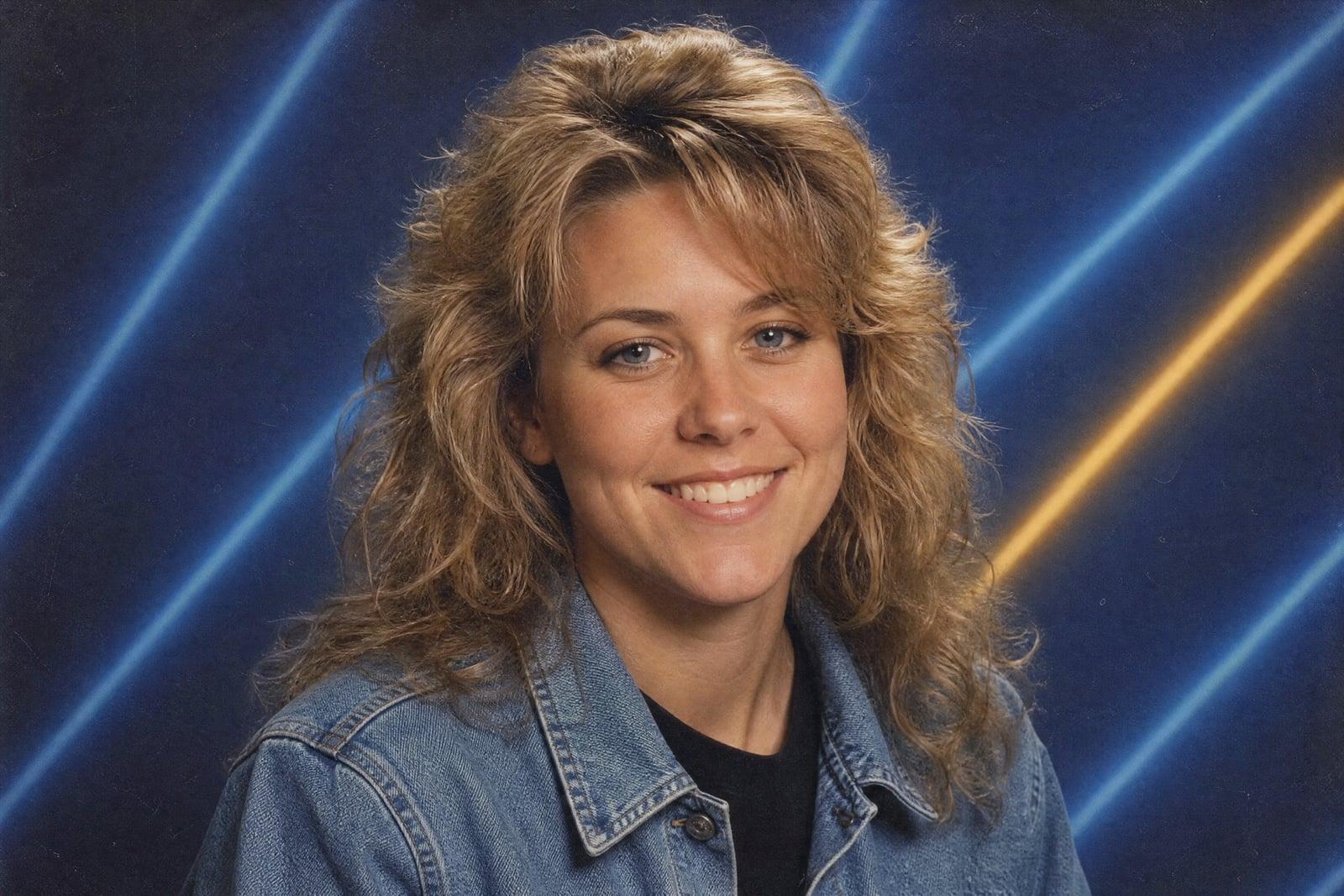
The 90s Yearbook Photo tool turns your selfie into a retro school yearbook portrait: laser beam background, feathered hair, denim jacket, the whole aesthetic that went viral. Upload one photo of yourself, pick a vibe if you want, and generate. You come out looking like page 47 of a 1994 yearbook, and the result is saved to your library ready for the group chat.
What is the 90s Yearbook Photo?
This is the yearbook trend as a single-purpose tool. Upload one photo, generate, and you get a studio-style school portrait with period-correct styling: the airbrushed laser or gradient backdrop, era hair with real volume, a turtleneck or denim situation, and that slightly-too-formal school photographer pose. Rerunning gives you a different styling pull from the same decade.
Nailing the look manually would mean sourcing a laser backdrop, era wardrobe and a mall photographer from 1993. The hard part the tool solves is keeping you recognizable underneath the transformation. The hair, clothes and photo grain change completely while your face stays yours, which is exactly why these photos are funny instead of random.
90s Yearbook Photo features
Period-correct everything
Laser and gradient backdrops, feathered and crimped hair, turtlenecks, denim on denim, soft mall-studio lighting and the faint print grain of a real yearbook page. The details are what sell it.
You, but in 1994
Your face survives the makeover intact. Friends recognize you instantly, which turns the image from a random retro portrait into a joke that needs no caption.
Multiple era styles
Rerun for a different pull from the decade: class-president blazer, grunge kid, mathlete with enormous glasses. One selfie can populate half a fictional graduating class.
Built for sharing
The format is instantly legible on social feeds because everyone has seen a real version. Group chats respond to these faster than almost anything else you can post.
How to use the 90s Yearbook Photo
- 1
Upload your selfie
A clear, front-facing photo works best, since school portraits are head-on by nature. Good light matters more than a fancy camera.
- 2
Pick your 90s flavor
Lean preppy, grunge or class clown if you have a preference, or leave it to chance for the authentic yearbook lottery experience.
- 3
Generate
A few moments later you are wearing decade-appropriate hair in front of a laser background. The image saves to your library automatically.
- 4
Rerun for the full spread
Generate a few variants and post them as a set. A grid of four different 90s versions of the same person lands harder than a single shot.
90s Yearbook Photo details
| Best for | Anyone who wants the viral yearbook look for the group chat |
|---|---|
| Category | Portraits & people |
| Powered by | Nano Banana (Google) |
| Credits per image | 20 credits at 1K |
| Photos you upload | Your photo |
| Aspect ratios | 3:4, 1:1 |
| Adjustable options | Yearbook vibe |
| Included in plans | Standard, Premium, Pro |
What people make with the 90s Yearbook Photo
Group chat ammunition
Drop your yearbook version into the chat unannounced and watch everyone else make theirs within the hour. It is the rare trend that gets funnier with each participant.
Birthday roasts
Generate the birthday person in full 1993 mathlete styling and put it on the card or the party slideshow. Affectionate, specific and impossible to ignore.
Team socials at work
A slide of the whole team as a 90s graduating class is a reliable icebreaker for all-hands meetings and offsites. Everyone submits a selfie, one person generates the set.
Throwback profile seasons
Swap your profile picture to the yearbook version for a week. It reads as playful without oversharing, and people who lived the 90s will comment first.
90s Yearbook Photo FAQ
What is the 90s Yearbook Photo trend exactly?
It is the viral format where a modern selfie is restyled as a school yearbook portrait from the early 90s: laser backdrop, era hair and wardrobe, mall-studio lighting. This tool produces that exact look from one uploaded photo in about a minute.
Do I need multiple selfies like the original trend apps?
No, one clear photo is enough here. Some early trend apps wanted a dozen uploads and an overnight wait. This generates from a single selfie in moments, and you can rerun it for more styling variations whenever you like.
Will I actually be recognizable in the yearbook photo?
Yes, that is what makes the format work. The styling, hair and background transform completely while your facial features stay recognizably yours. If a particular run drifts, regenerate; each attempt is quick.
Can I choose the style, like grunge or preppy?
Yes. You can steer toward preppy, grunge, sporty or classic class-photo styling in the options, or leave it unset and let the generator surprise you. Rerunning with different choices from one selfie builds a full character lineup.
Is it okay to post these on social media?
Yes. Images you generate are yours to post, print or meme freely. Your uploaded selfie stays in your private library and is used only to make your images. You can delete it anytime.
Related tools
Pricing
Choose the perfect plan to unlock more creativity with premium AI-powered image generation.
Standard
Perfect for creators and content makers
- 1,500 Credits per month
- High-quality AI image generation
- Text-to-image & image-to-image
- Premium templates library
- Priority support
Premium
For professionals and power creators
- 4,000 Credits per month
- Ultra high-quality generations
- Advanced AI models & styles
- Priority processing & support
- Commercial usage rights
Pro
Most advanced models for premium visuals
- 10,000 Credits per month
- All models incl. Nano Banana PRO
- All resolutions (1K, 2K & 4K)
- Premium-quality generation & smart edits
- Priority processing & support
Need more credits?
All plans include the option to purchase additional credit packs when you need extra generating power. Scale your creativity without limits.
Payments are securely processed by Stripe, our merchant of record. Subscriptions renew automatically at the listed price until you cancel; cancel anytime in your account settings. By continuing you agree to our Terms, Privacy Policy and Refund & Cancellation Policy. Need help? Contact support@nanobananai.ai.