Style transforms
Embroidery Art: see your photo as hand-stitched hoop art
Renders photos as realistic thread-and-hoop embroidery for crafters and gift-givers.
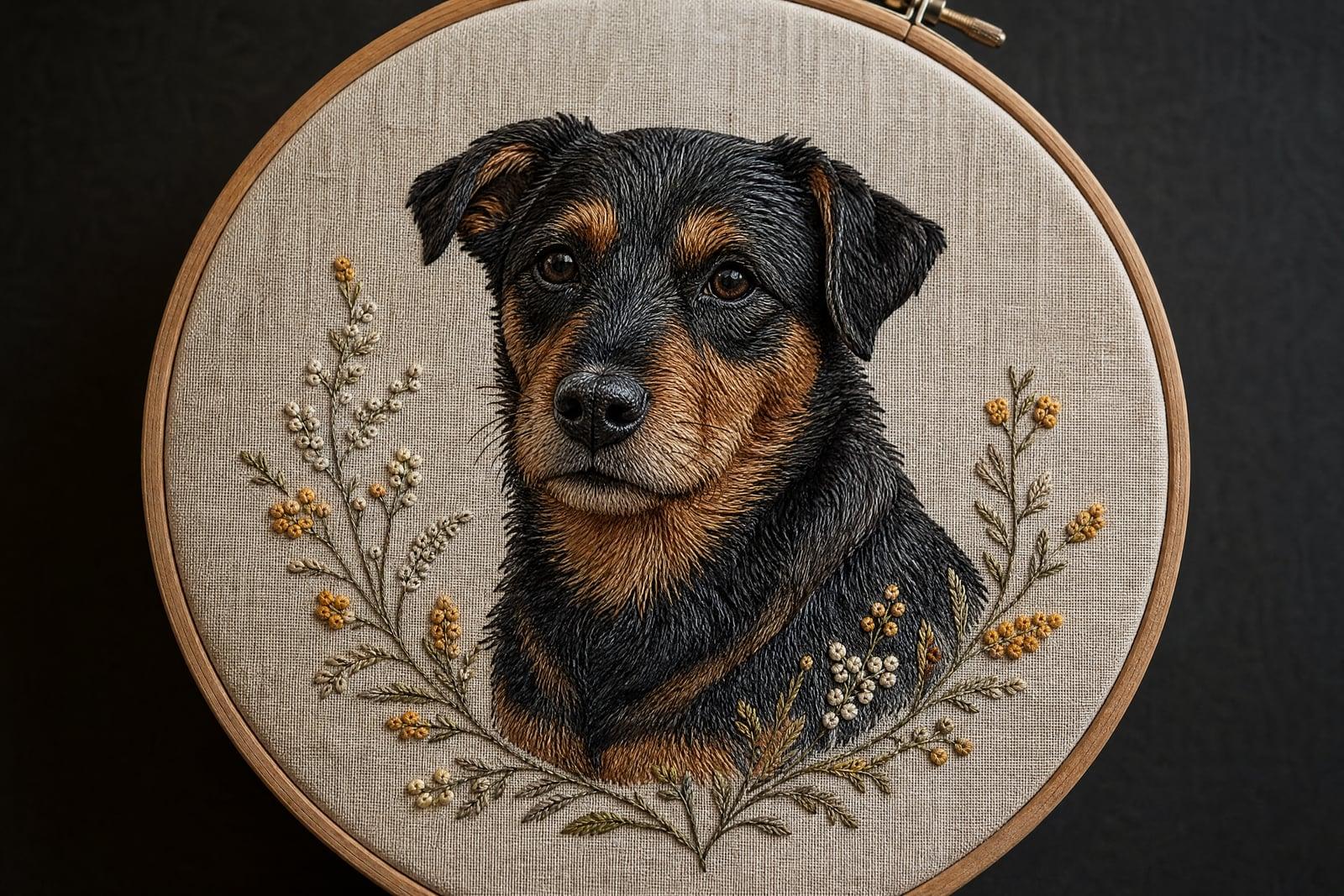
Embroidery Art renders your photo as hand-stitched embroidery, satin stitches, french knots, and visible thread texture, framed inside a wooden hoop on linen. Upload one picture and generate. The result looks like weeks of needlework and lands in your library in moments, ready to download, print, or use as a pattern reference for the real thing.
What is the Embroidery Art?
Embroidery Art is a style tool on Nano Banana AI that reimagines photos as fiber art. You upload a photo, a pet, a couple, a house, a bouquet, and generate. The tool redraws it as stitched thread: directional satin fills that follow fur and hair, knotted texture for flowers and foliage, and a clean linen background stretched in a hoop. It is a finished image, not a machine-embroidery file.
Thread behaves nothing like paint. Every area of an embroidered piece needs a stitch direction, and getting fur, petals, and skin to read correctly means constantly changing that direction and stitch type. That is what separates lively embroidery from a flat cross-stitch grid. The tool makes those stitch decisions across your whole photo, which is why the fake needlework looks convincingly handmade.
Embroidery Art features
Stitch-level realism
Satin stitches follow the direction of fur and hair, french knots cluster into blossoms, and thread sheen catches the light. Even zoomed all the way in, the piece still reads as genuine needlework.
Hoop and linen framing
Pieces come composed in a wooden hoop on natural linen, so the image works as-is for prints, craft shop listings, or a cozy profile picture without any extra framing work in an editor.
Pets and people both work
A golden retriever's coat becomes long directional stitches, and a couple's portrait becomes folk-art thread work. Subjects stay recognizable inside the craft style, down to a dog's eyebrow patches and a partner's glasses.
Pattern inspiration
Real stitchers use the output as a color and composition reference before starting an actual hoop. It saves the guesswork of translating a photo into thread, which is the hardest part of planning a piece.
How to use the Embroidery Art
- 1
Upload your photo
Simple compositions shine here: one pet, one face, one bouquet, one house. Thread rendering flattens fine detail, so bold subjects work best.
- 2
Generate the stitchwork
The tool converts your photo into embroidered texture inside a hoop. Look closely at stitch direction on hair and fur; that is where the magic is.
- 3
Rerun for thread style
Regenerate to vary palette and stitch density. A sparser pass feels folk-art rustic, a dense one feels like fine needle painting.
- 4
Download or stitch it
Save the version you love. Print it, gift it, or use it as the reference chart for stitching a real hoop by hand.
Embroidery Art details
| Best for | Crafters and gift-givers who love the stitched hoop look. |
|---|---|
| Category | Style transforms |
| Powered by | Nano Banana (Google) |
| Credits per image | 20 credits at 1K |
| Photos you upload | Your photo |
| Aspect ratios | 1:1 |
| Adjustable options | None, one-click result |
| Included in plans | Standard, Premium, Pro |
What people make with the Embroidery Art
Pet memorial hoops
An embroidered rendering of a pet who passed is a gentler keepsake than a raw photo. The handcraft texture gives the image the warmth the moment deserves, and it sits kindly on a shelf.
Wedding and anniversary gifts
The first-dance photo as stitched hoop art makes a cotton-anniversary gift with an actual story behind it. Print it small, frame it, and stand it beside the original photo for the full effect.
Craft shop listings
Embroidery sellers mock up commission previews so buyers can see roughly how their photo translates to thread before any real stitching starts. Fewer surprises means fewer refunds and much happier reviews.
New home portraits
A stitched rendering of a first house, hoop and all, is a housewarming gift that feels heirloom-ish without the months of needlework. Pair it with the keys photo and watch someone tear up.
Embroidery Art FAQ
Does Embroidery Art give me a file I can run on an embroidery machine?
No. It generates a realistic image of embroidered art, thread, stitches, hoop, and linen, not a machine-readable stitch file like PES or DST. Stitchers do use the output as a visual reference or pattern inspiration for hand embroidery, though.
What photos turn into the best embroidery renders?
Bold, simple subjects: a single pet, a face, flowers, a house front. Thread texture eats fine detail, so busy backgrounds and small distant figures get lost. Crop tight on the subject before uploading and the stitches will have room to describe it.
Will my dog still look like my dog in thread?
Yes. The tool keeps markings, ear shape, and expression recognizable while translating the coat into directional stitches. Distinctive patches and eyebrows come through especially well, which is what makes pet hoops such a popular use.
Can I sell prints of the embroidery images I make?
Yes, images you generate are yours to use commercially. Shops sell them as prints and use them as commission previews. If you sell, generate a few variations first and pick the render with the cleanest stitch detail at full size.
How long does a render take, and can I try different color palettes?
Generation takes seconds, and rerunning is quick, so trying different thread palettes and stitch densities is the normal workflow. Most people generate three or four hoops and keep the one where the colors sit best on the linen.
Related tools
Pricing
Choose the perfect plan to unlock more creativity with premium AI-powered image generation.
Standard
Perfect for creators and content makers
- 1,500 Credits per month
- High-quality AI image generation
- Text-to-image & image-to-image
- Premium templates library
- Priority support
Premium
For professionals and power creators
- 4,000 Credits per month
- Ultra high-quality generations
- Advanced AI models & styles
- Priority processing & support
- Commercial usage rights
Pro
Most advanced models for premium visuals
- 10,000 Credits per month
- All models incl. Nano Banana PRO
- All resolutions (1K, 2K & 4K)
- Premium-quality generation & smart edits
- Priority processing & support
Need more credits?
All plans include the option to purchase additional credit packs when you need extra generating power. Scale your creativity without limits.
Payments are securely processed by Stripe, our merchant of record. Subscriptions renew automatically at the listed price until you cancel; cancel anytime in your account settings. By continuing you agree to our Terms, Privacy Policy and Refund & Cancellation Policy. Need help? Contact support@nanobananai.ai.