Business & marketing
Day to Dusk: twilight listing photos without a second shoot
Upload a daytime exterior and get the golden-hour twilight shot agents pay retouchers for.
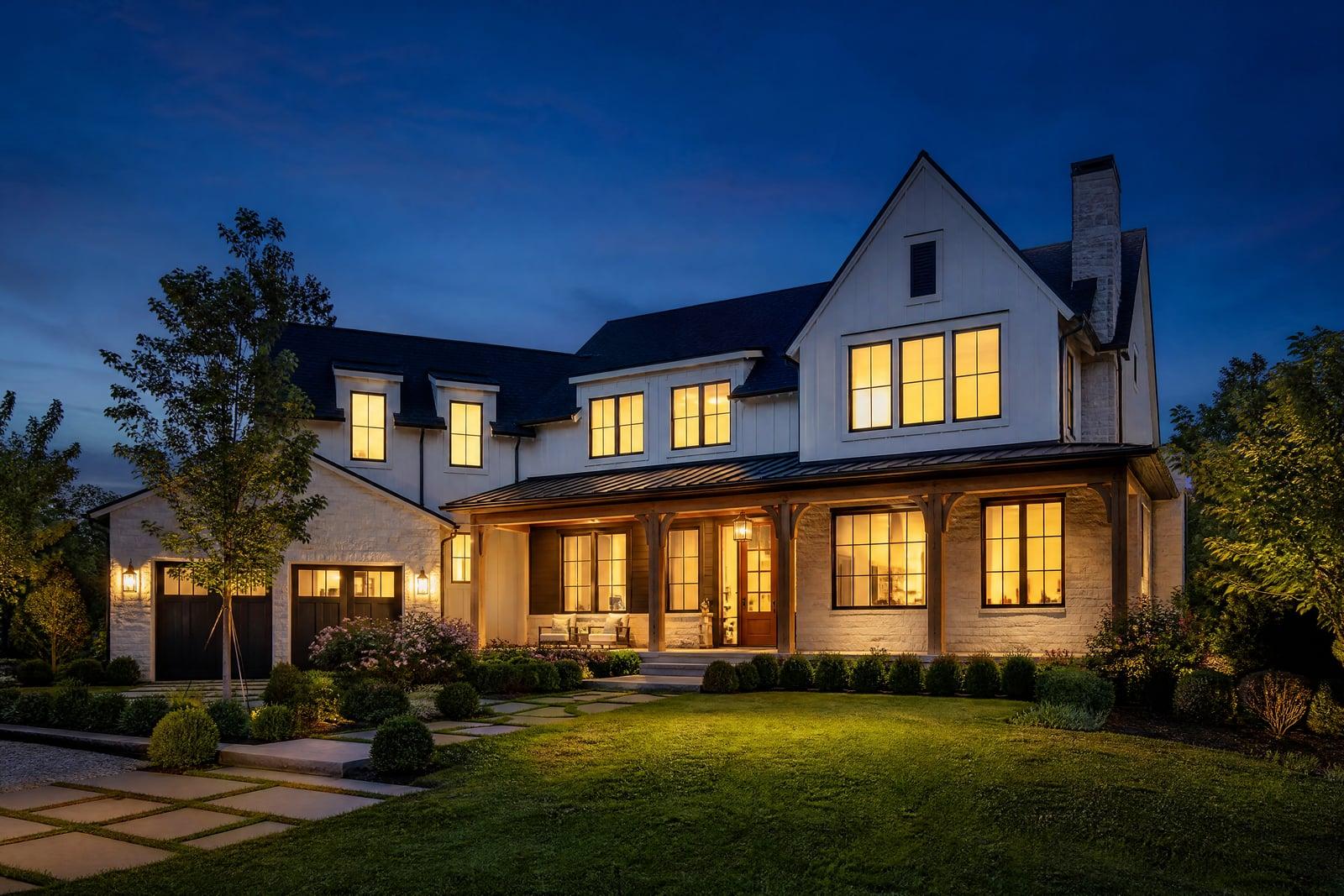
Day to Dusk converts a daytime exterior photo into a twilight shot. Upload the front elevation from your regular midday shoot, generate, and get back the same house under a deep dusk sky with warm light glowing in the windows. The architecture, landscaping, and framing stay exactly as photographed. Twilight exteriors are the images agents pick for the listing hero slot, and this produces one without a return trip at sunset.
What is the Day to Dusk?
Day to Dusk is a single-purpose conversion tool for real estate exteriors. You upload one daytime photo of the property, ideally the straight-on front elevation, and generate. The tool replaces the flat midday sky with a graded dusk gradient, turns the windows warm as if every room is lit, and rebalances the scene so the house glows against the evening. The download is ready for the listing.
Real twilight photography is a logistics problem. The usable window lasts roughly twenty minutes, it requires a second visit timed to sunset, and every lit window means someone walking the house flipping switches. That is why photographers charge a premium for it. The conversion route skips all of it: the shoot happens at whatever hour the listing shoot was already booked, and the twilight version is generated afterwards.
Day to Dusk features
The house stays the house
Rooflines, siding, landscaping, and driveway remain exactly as shot. Buyers who drive past the property should see the same home as the photo, just at a more flattering hour.
Warm window glow
Windows light up as if the whole home is occupied and welcoming, the detail that makes twilight shots feel expensive. Glow is applied where windows actually are, not painted at random.
Graded dusk sky
The washed-out midday sky becomes a deep blue-to-amber gradient. Overcast originals benefit the most, since a grey sky is the fastest way to make a good house look tired.
One photo per listing
Convert just the hero exterior or run the back patio and pool shots too. Each conversion is quick, so a photographer can add a twilight set to every package sold this week.
How to use the Day to Dusk
- 1
Upload a daytime exterior
Use a straight-on or slightly angled front elevation with the windows visible. Midday and afternoon shots both work; avoid photos where trees hide most of the glass.
- 2
Generate the twilight version
Run the conversion and watch the sky, windows, and exterior lighting shift to dusk. The framing and architecture do not move.
- 3
Compare with the original
Check window placement and rooflines side by side with your source photo. If a reflection or glow lands oddly, regenerate; each attempt takes moments.
- 4
Download for the listing
Download the twilight shot for the MLS hero slot, brochures, and social posts. Keep the daytime original in the gallery so buyers see both moods.
Day to Dusk details
| Best for | Agents and photographers who want twilight shots without sunset shoots. |
|---|---|
| Category | Business & marketing |
| Powered by | Nano Banana 2 (Google) |
| Credits per image | 40 credits at 1K |
| Photos you upload | Daytime exterior photo |
| Aspect ratios | Follows the input image |
| Adjustable options | None, one-click result |
| Included in plans | Premium, Pro |
What people make with the Day to Dusk
Listing hero shots
An agent choosing the first photo buyers scroll past can lead with a glowing twilight exterior instead of a flat noon shot. The hero image decides whether anyone opens the listing.
Photographer upsells
A real estate photographer can add a virtual twilight option to every package without staying past sunset, turning one booked hour into a higher-value deliverable.
For-sale-by-owner
A homeowner selling without an agent shoots the house on a Saturday morning with a phone and still gets the premium-looking dusk photo the listed competition has.
Vacation rentals
A cabin or beach house listing gains a warm, lights-on evening exterior that says arrival and holiday, the exact mood a midday photo of an empty driveway never delivers.
Day to Dusk FAQ
How does Day to Dusk conversion work?
You upload one daytime exterior photo and the tool regenerates it as a twilight scene: dusk sky, warm lit windows, and balanced evening light. The building, landscaping, and composition stay as photographed. Download the result for your listing.
Which photos convert best?
Front elevations shot straight on or at a gentle angle, with windows clearly visible and the whole facade in frame. Harsh shadows are fine. Heavy tree cover in front of windows limits where the glow can appear.
Can I use converted photos on the MLS?
Yes, the images are yours to use commercially. Some MLS boards ask that digitally altered photos be disclosed as such, so check your local rules and label the shot as a virtual twilight where required.
Does the house itself get changed?
No. The point of the conversion is a different time of day, not a different property. Architecture, paint color, and yard stay as shot. Compare the output against your original before publishing, as you would with any retouched photo.
How long does a conversion take?
Moments per photo, and regenerating an alternate take is just as fast. A photographer processing a full day of shoots can add twilight versions to every property the same evening.
Related tools
Pricing
Choose the perfect plan to unlock more creativity with premium AI-powered image generation.
Standard
Perfect for creators and content makers
- 1,500 Credits per month
- High-quality AI image generation
- Text-to-image & image-to-image
- Premium templates library
- Priority support
Premium
For professionals and power creators
- 4,000 Credits per month
- Ultra high-quality generations
- Advanced AI models & styles
- Priority processing & support
- Commercial usage rights
Pro
Most advanced models for premium visuals
- 10,000 Credits per month
- All models incl. Nano Banana PRO
- All resolutions (1K, 2K & 4K)
- Premium-quality generation & smart edits
- Priority processing & support
Need more credits?
All plans include the option to purchase additional credit packs when you need extra generating power. Scale your creativity without limits.
Payments are securely processed by Stripe, our merchant of record. Subscriptions renew automatically at the listed price until you cancel; cancel anytime in your account settings. By continuing you agree to our Terms, Privacy Policy and Refund & Cancellation Policy. Need help? Contact support@nanobananai.ai.